

"What deserves my attention this morning? How do I handle today's urgent issues?"
In an e-commerce back office, answering that question often means opening several screens (orders, inventory, products, dashboards) and then piecing the information together before deciding what to do.
The merchant assistant example in Shopify's Claude for Commerce Examples project, described in its merchant README, offers a different starting point:
- Claude reads the store's data,
- flags situations worth reviewing,
- and can prepare certain changes.
However, applying them requires explicit approval.
The goal is not to replace the e-commerce team, of course, but to shorten the time between asking a question, analyzing it and taking an action that can be verified.
An AI back-office assistant is an agent connected to a store's data (products, orders, inventory) that reads, analyzes and prepares changes in natural language. In Shopify's example, every write stays pending until it is explicitly approved in the app: the assistant proposes, the team decides.
What can Claude do on Shopify: read, prepare, apply?
The project separates three steps that shouldn't be confused.
| Level | Assistant's role | Impact on the store |
|---|---|---|
| Read and analyze | Look up products, orders, inventory and metrics | No changes |
| Prepare | Build a change proposal and its preview | The change is queued |
| Apply | Execute an approved proposal | Shopify data is modified |
This distinction is essential to the architecture: preparing a change does not touch the Admin API. The app must first authorize execution through a separate call.
So the model shouldn't treat a casual "looks good to me" as enough authorization to publish. Approval belongs to the application, not to the conversation alone.
For an e-commerce merchant, the difference from a general-purpose chatbot is significant: the assistant doesn't just list the steps to follow in Shopify; it can also prepare the matching operation, without publishing it.
Claude for Commerce Examples: Shopify's demo store
The repository provides an environment with eight products and nine starting orders, in deliberately varied situations:
- low stock,
- incomplete product content,
- multiple price variants,
- a slow-selling product
- and a draft product.
The local simulator also adds fictional historical orders so you can compare periods. These are not real sales results.
Note (October 2026): the project is changing fast. The figures and prompts cited come from the merchant README as read on October 25, 2026, tested by Shopify against Admin API 2026-07.
This data supports several concrete use cases.
How do you spot your store's urgent issues every morning?
The documented starting request is:
"What deserves my attention this morning?"
The backend generates alerts from the data and configurable thresholds, for example for low stock, slow-moving products, late orders or rising returns. It also displays metric trends and analysis cards.
The assistant thus works as a triage interface: it highlights what to look at, then lets the user decide what happens next.
That doesn't mean it knows all of the brand's priorities, though: a stockout on a strategic product calls for a different response than one on an end-of-life item.
The prototype should therefore be judged on how well it surfaces useful signals, without turning every alert into an emergency.
How do you prepare a price change across multiple variants?
Another documented request:
"Increase the folding stool's price by 10%."
The demo product comes in two variants, priced at 60 and 90 (no currency in the demo). The proposal adjusts both prices instead of treating the product as if it had a single price. The user must approve the change before it is applied.
This example shows where the operational value lies: answering a simple request using the catalog's actual objects.
For an e-commerce team, a suitable approval interface should show the affected variants along with the before and after prices. That's a design requirement, not a reason to let the model act unchecked.
How do you improve a product page and adjust stock?
The README also presents a combined request:
"This product is almost out of stock and its page is too thin: prepare one month of stock at the current sales rate and a description that answers shoppers' questions. Show me both before anything is published."
The AI agent can prepare an inventory change and a content update for review: the proposals stay pending until they are approved.
It's important to be clear that changing inventory in Shopify does not mean ordering products. The project shows no supplier purchase order being created, no physical receipt of stock and no replenishment being set up.
In a physical store, an increase in available stock should never be confused with a calculated replenishment need: they are two distinct business operations.
How does Claude connect to Shopify through the GraphQL Admin API?
The merchant example relies on Shopify's GraphQL Admin API. Claude can read data and prepare operations related to the catalog, pricing, content and inventory. The project includes an API backend, but no full interface for operators.
The workflow can be pictured like this:
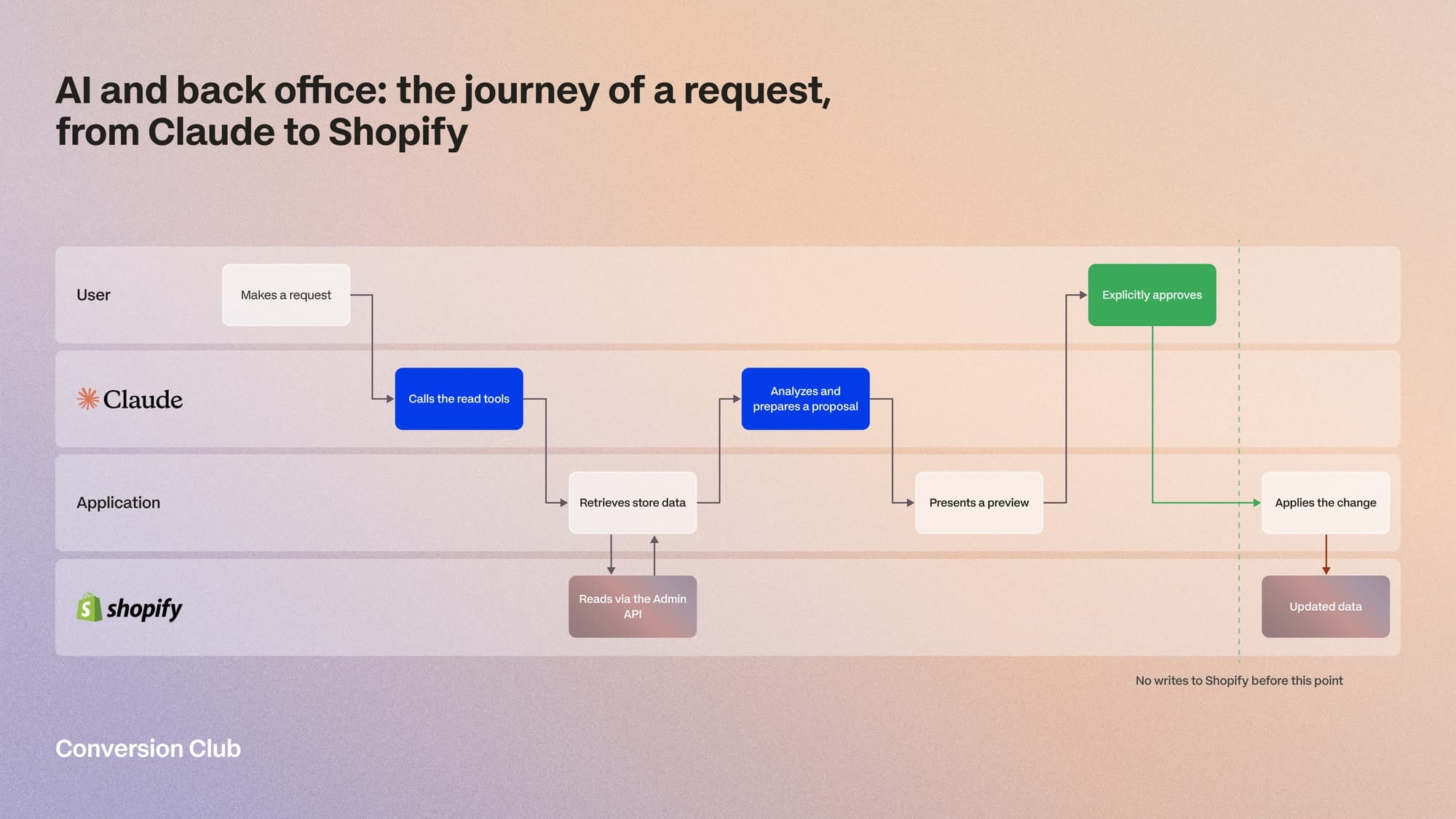
The conversation helps express the need. The tools connect it to the data, while the application defines what can actually be executed.
This helps separate two promises:
- "Claude explains how to change your prices."
- "Claude prepares price changes for you to review before applying them."
The repository illustrates the second approach. But it's a development foundation: a team still has to build the review interface and adapt the workflow to its own processes.
The limits of a Shopify AI assistant: what the demo doesn't prove
The demo is interesting precisely because it stays limited. It doesn't show that a store can hand its entire operations over to an agent.
An alert is not a business decision
A slow-selling product might justify a promotion, better placement or no action at all if it rounds out the assortment.
The assistant can help spot the signal, but the decision requires business context that orders and the catalog don't always contain.
An AI-generated product page must stay factual
An assistant can write a clearer product page even if it doesn't have all the necessary details: fit, compatibility, care, origin or uses.
For deployment, I'd set a simple rule: any missing information should trigger a question to fill in, not be replaced by an invented feature. Editorial review should focus as much on factual accuracy as on writing quality.
A stock forecast is an assumption, not an order
A projection based on the recent sales rate can be useful, but on its own it ignores supplier lead times, minimum order quantities, expected deliveries and seasonality.
The result should therefore be presented as a decision-support tool, with its assumptions, rather than as an instruction to execute automatically.
A prototype doesn't measure production performance
The simulator's products and orders are fictional. On its own, the repository can't measure time saved, fewer errors or higher sales in a live store.
Each merchant needs to evaluate those benefits in their own context.
Where to start? Three AI pilots for a Shopify brand
For an e-commerce team, I'd start with a routine, well-defined task that's easy to verify, rather than a broad instruction like "optimize my store."
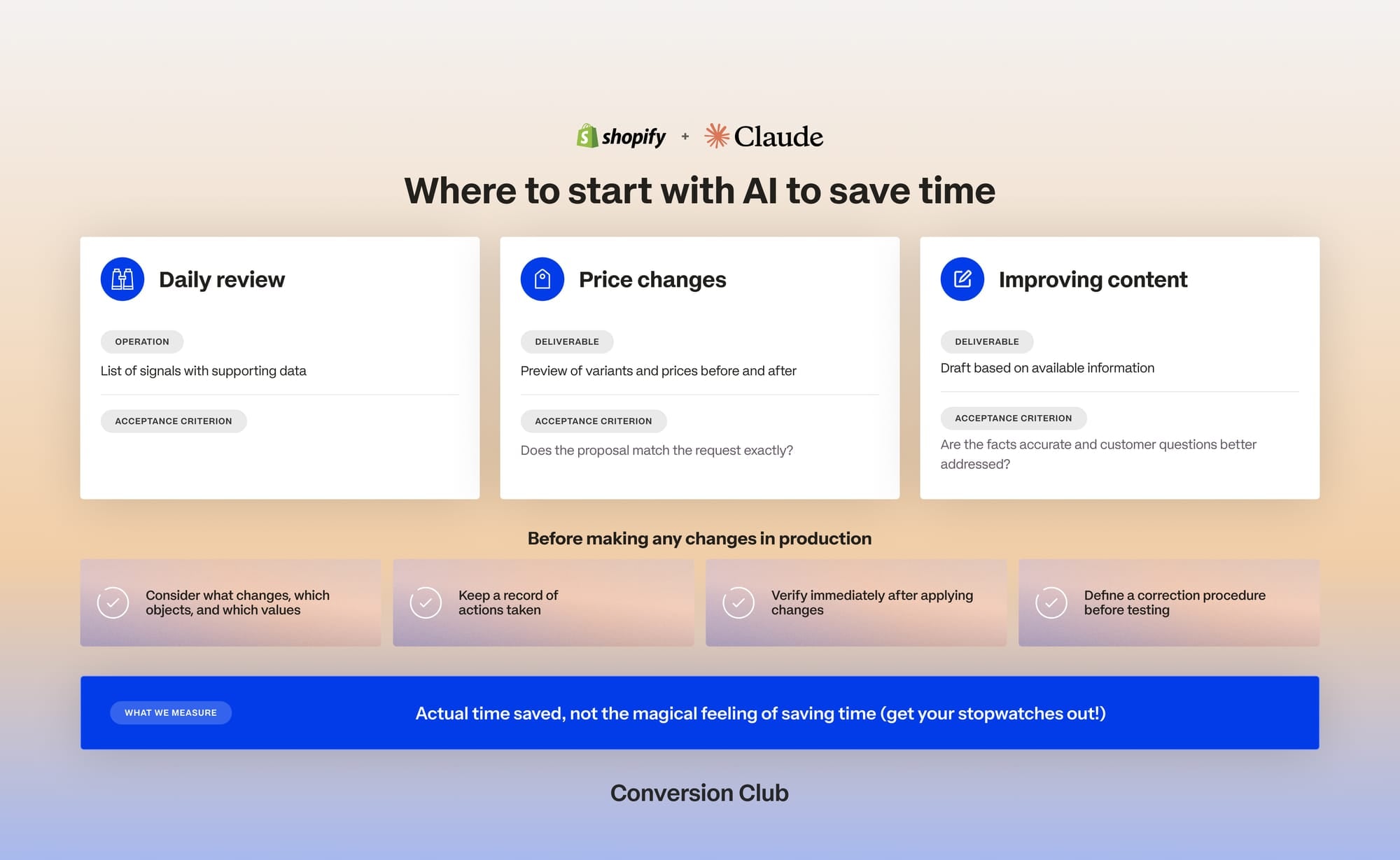
Three pilots are worth considering:
| Proposed pilot | Expected deliverable | Evaluation criterion |
|---|---|---|
| Daily review | List of alerts with the data behind them | Are the topics relevant and clearly explained? |
| Preparing price changes | Preview of variants and before/after prices | Does the proposal match the request exactly? |
| Improving product pages | Draft based on the available information | Are the facts accurate, and are customer questions better answered? |
These criteria are suggested evaluation measures, not results reported by Shopify.
Before any write in production, the interface should spell out the planned changes, the objects affected and the values applied. I'd also build in an action history, a check after changes are applied and a correction procedure.
The right metric isn't just "how much content Claude produced." It's also the time needed to get a usable proposal, how often corrections are needed, and the number of errors avoided or introduced.
Shopify's project thus sketches a credible role for AI in the back office: turning an operational intent into an action ready to execute. The assistant gathers the information and cuts down on manual work, while the team keeps the business judgment.
The line to respect is clear: analyzing doesn't mean deciding, preparing doesn't mean publishing, and changing a stock number doesn't bring a product into the warehouse.
Frequently asked questions
Can Claude change my Shopify store on its own?
No. In Shopify's example, the preparation tools send no mutation to the Admin API: the change is logged, previewed, then applied through a separate app call after approval. If the agent tries to apply it itself, the approval gate stops it.
Do you need a Shopify store to test the project?
No. The project provides a locally simulated store (ACME Supply Co.) with eight products, nine orders and two months of made-up history, which is enough to try all three use cases.
What's the difference between a chatbot and this back-office assistant?
A chatbot explains the steps to follow in Shopify; the assistant reads the store's real data and prepares the matching operation, without publishing it.
What does the demo not show?
No measurement of time saved or errors avoided in production, no supplier orders, no operator interface: each merchant still has to build and evaluate these pieces.


