"I'm looking for a gift idea under $50. What do you recommend?"
The AI suggests products.
The customer replies, "Add the first one to my cart," then asks about the return policy. The cart updates, and all that's left is to check out.
This is one of the scenarios documented in Shopify's "Claude for Commerce Examples" project (repository status as of October 20, 2026).
It's a concrete illustration of agentic commerce: a conversation that triggers actions on a real catalog and a real cart.
The point isn't to promise an autonomous store. It's to show merchants what an assistant can do, what information it uses, and where its limits are.
An agentic shopping assistant is a conversational AI connected to a store's tools. It searches the catalog, answers from the store's policies, and changes the cart. Payment is still made by the customer.
Where does the conversation with the assistant take place?
First, it helps to understand where the conversation happens. When people think of agentic commerce, they tend to assume they'll ask Claude a question and the whole experience will unfold in the chat.
That's not the only possible use case.
Think of Claude, or any other AI model, as a service provider. For example, the project provides a custom shopping app with a product grid, a conversation panel, and a cart.
Claude runs behind this interface through its API. The app also pulls in elements from the configured store, including its visual identity and products from its catalog.
The flow looks like this:
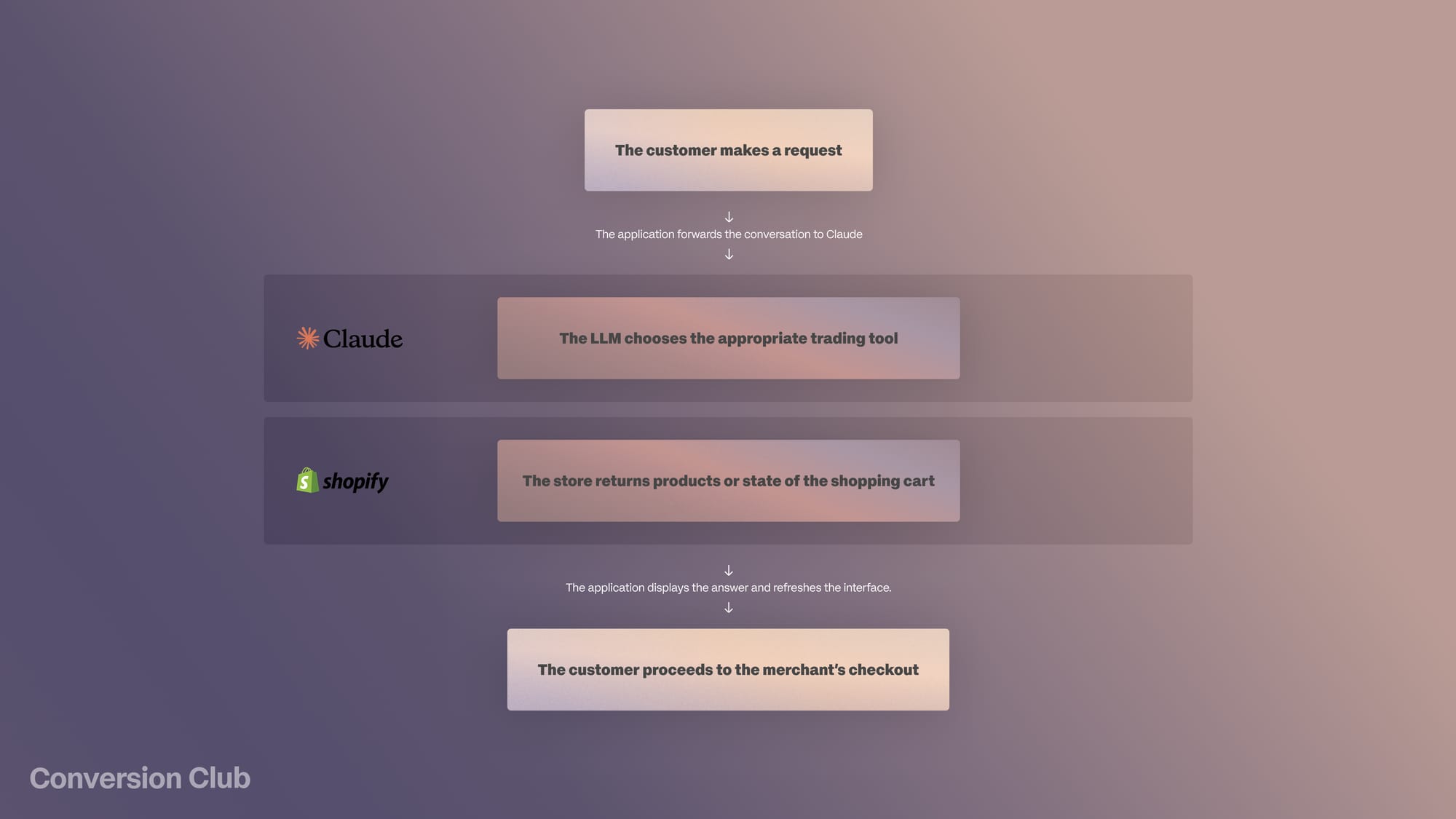
The idea behind agentic commerce is to let merchants reduce friction and make buying easier. This architecture lets customers chat and act on the answers to their requests within the same experience.
They don't just get a link to a product page. They're building their cart by adding products to it.
One caveat: the project Shopify shared isn't a ready-to-use product. It's a technical reference that provides an app to deploy and adapt.
It isn't a widget that automatically gets added to your Shopify theme. It also includes an example assistant for merchant-side operations, which we'll cover in another article. Here, we focus on the buyer-side experience.
What makes a shopping assistant agentic?
A chatbot simply tries to explain a product to answer your question. An assistant, on the other hand, has tools to look up commercial information and take certain actions.
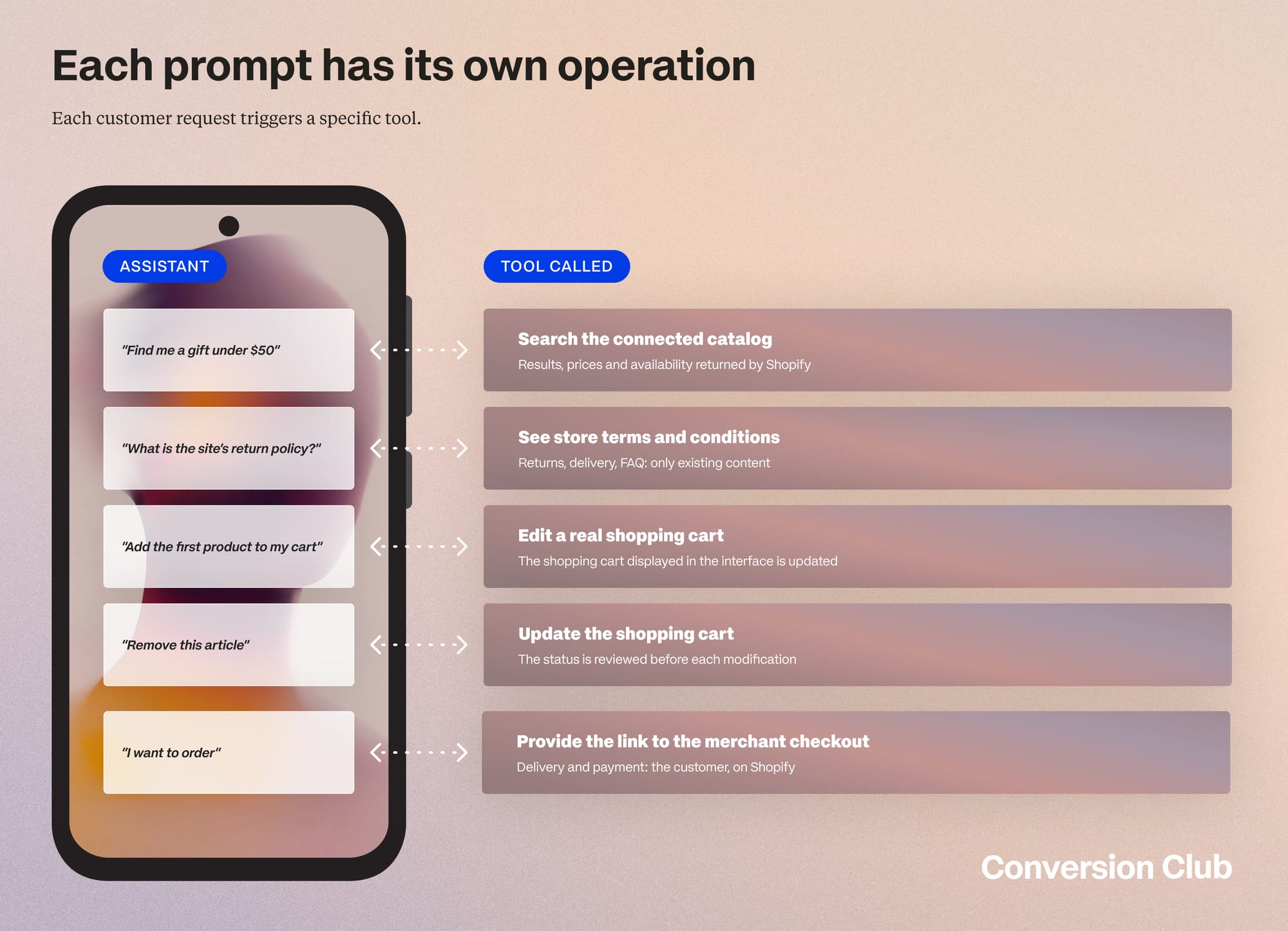
These capabilities are documented in the example provided on GitHub. At the end of the experience, customers enter their shipping and payment details themselves on Shopify's checkout pages. In practice:
- Claude interprets the request and chooses the tools
- Shopify's services supply the data and run the authorized operations
So the model doesn't need to invent a price or fake an add-to-cart. The app uses the result Shopify returns.
The project uses commerce endpoints compatible with UCP, the Universal Commerce Protocol, and can integrate Sign in with Shop. The protocol is the exchange layer; Claude remains the interpretation layer. An intent expressed in natural language becomes a verifiable operation in the interface.
| Chatbot | Agentic assistant (Shopify project) | |
|---|---|---|
| Price and stock | Written by the model, with no guarantee they're up to date | Read from the catalog by Shopify's tools |
| Adding to cart | Link to the product page | Direct add, cart re-read before every change |
| Return policy | Generic answer | Answer drawn from the store's policies and FAQ |
| Orders | No access | Only those placed through the agent, at the buyer's request |
| Payment | Out of scope | Entered by the customer at Shopify checkout, never completed by the agent |
What can the assistant do for the customer?
Find a gift within constraints
This is the repository's most explicit scenario: look for a gift within a set budget, pick one of the suggestions, add it to the cart, and check the return policy.
"I'm looking for a housewarming gift under €80. Show me a few options and explain the breakage guarantees."
What matters here is combining selection with reassurance. Customers don't have to leave their search to read a policy page and then find the product again.
Help without replacing browsing
Customers can still discover products by browsing visually, while the assistant offers another way to interact with the store, though not necessarily the only one.
The project can also attach to an existing cart using its ID. Before changing it, it re-reads the cart's state so it doesn't overwrite changes made elsewhere.
This coexistence deserves testing before you consider a fully conversational experience. Some customers know exactly which category to open. Others prefer to describe what they need.
Answer when a question is blocking the sale
The return policy is part of the documented scenario. More broadly, the project answers from the store's policies and FAQ.
Its value then depends on the content available.
An assistant can't make up for missing or ambiguous information. To answer questions about size or fit accurately, a brand has to make sure that information is accessible to the tools.
The repository doesn't show that an assistant can determine the ideal size for every customer.
Look up some order information
The project provides limited access to orders: only those placed through this agent, with the necessary scope, and at the buyer's request.
Without this capability, the assistant says tracking isn't available and points to the confirmation email.
So it shouldn't be presented as a customer service tool with access to the merchant's full history. An interface can look general-purpose while its tools have a very narrow scope.

Does Claude know the customer's purchase history?
The word "personalization" covers several mechanisms.
The first is conversational: if the customer mentions a budget or an occasion, the assistant uses that to guide its search. Guest mode already lets people browse the catalog without signing in to Shop.
The second goes through Sign in with Shop. The repository describes an authentication flow that provides a buyer token, stored server-side and tied to the session.
This token is not passed to the model. The README presents this path as enabling personalized search results. It doesn't detail the historical signals used or the ranking algorithm.
It would be overstating things to conclude that "Claude knows the customer's purchases and understands their style across all Shopify stores."
Another nuance: Shopify's Global Catalog documentation says personalized search is "coming soon." That documentation and the storefront example may not describe the same scope, but neither supports promising universal history-based personalization.
What we can say comes down to three points:
- For the current conversation, the app passes the necessary context to the model.
- For commerce data, the tools give access to the catalog and the cart within their scope.
- As for lasting personal history, the project mentions neither a full memory across multiple sites nor a universal taste profile.
The repository also targets a single configured store. It doesn't compare multiple brands. Shopify Global Catalog provides infrastructure built for multi-brand discovery; connecting to it would mean building a different experience.
How do you test an agentic assistant on your store?
The right starting point isn't "let's install an AI." It's a specific flow where you check every step.
For a fashion or home decor brand, a first prototype could focus on gift shopping: setting the budget, picking a few products, answering questions about returns, adding to the cart, and going to checkout.
Test criteria:
- Do the recommended products respect the constraints the customer stated?
- Do prices, variants, and availability match the tool results?
- Does the assistant add exactly the item the customer chose?
- Does the cart stay consistent with changes made in the interface?
- Are the answers about policies accurate?
- Does the customer understand when they're leaving the conversation to pay?
- Is the flow more efficient than existing navigation for this task?
These aren't performance figures reported by Shopify. They help you decide whether the assistant adds real value to the catalog and the brand's customers.
The project sets a clear limit: it never calls the function that would complete the order and process the payment.
Checkout stays under the customer's control. The example doesn't assume full autonomy. It illustrates delegation limited to searching, explaining, and preparing the cart.
Frequently asked questions
Can Claude pay on the customer's behalf?
No. In Shopify's project, the assistant prepares the cart, then sends the customer to checkout. The function that would complete the order and payment is never called: customers enter their shipping and payment details themselves.
Is it a Shopify app you install on your store?
No. Claude for Commerce Examples is an open source technical reference: an app to deploy and adapt, not a widget you add to your theme. For a no-code assistant, Shopify points to Shopify Inbox.
Does the assistant have access to all of the customer's orders?
No. It only sees orders placed through this agent, at the buyer's request, with the necessary access rights. Without those rights, it points to the confirmation email.
Is the search personalized?
Partly. The current conversation guides the search. With Sign in with Shop, the README promises personalized results without detailing the signals used. For Global Catalog, Shopify's documentation says personalized search is "coming soon."