A complete e-commerce cart audit: cart drawer, cart page, cost transparency, free shipping threshold and upsell drivers, plus a post-mortem of a failed test.
The cart is the most misnamed page in e-commerce. Everything in its vocabulary suggests passive waiting: a summary, a subtotal, a step. In practice, it's the last sales page on the site, the one where the decision is almost made, and where "almost" is won or lost on details nobody looks at.
This page gave our series its most instructive story. In the first article of the series, we described a test of free shipping from €300, launched with confidence for a brand with a high average order value: add-to-cart rate rose 2.6%, conversion fell 24%, and average order value fell 36%.
This guide is where that test gets its post-mortem, because its lessons are the very substance of the cart audit.
Why did such a widely accepted incentive destroy value? Three hypotheses, and an honest admission that none is proven:
- Anchoring, first: displaying "free shipping from €300" may have set €300 as the reference price, flattening carts that were naturally building above it.
- Salience, next: making the threshold visible turned a smooth purchase into a math exercise, and every calculation is a chance to doubt.
- Brand signal, finally: for premium customers, conditional free shipping is a mass-market code, and that code may have cost more than the benefit earned.
The next test will settle between these hypotheses. In the meantime, one operational certainty: in the cart, the most standard drivers are the ones that interact most violently with price perception. Nothing goes in there without a test!
This guide is the seventh in our CRO audit series, built on our 194-point checklist, about ten of which cover the cart alone.
Read also:
 Jérémie Werner
The method is still the one from the pillar guide: checkpoints scored by impact and cost, and hypotheses ready to enter your testing program.
The two carts: the drawer and the page
Before the checklist, an architecture decision most audits ignore: your store has two carts, and they don't do the same job.
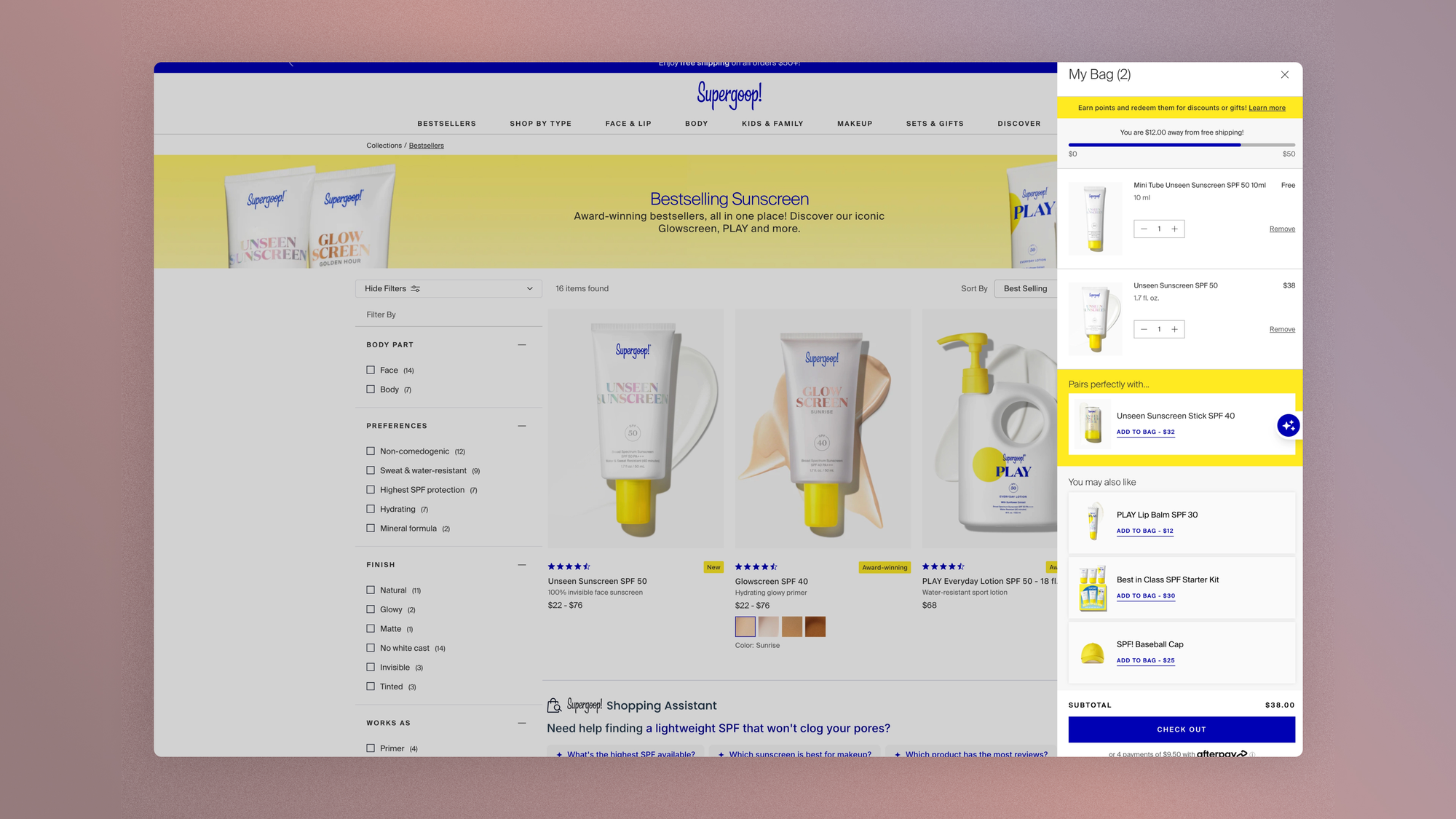
The cart drawer (the panel that opens when an item is added) is a continuation tool: its job is to confirm the addition, show the state of the cart, and let shoppers choose between continuing to shop and going to payment.
The cart page is a decision tool: it's where the order is reviewed, edited and confirmed. On Shopify, many recent themes assume a third model, the drawer alone with a direct path to checkout, which removes the cart page from the journey.
This shortcut suits single-product catalogs and impulse purchases; it costs you on multi-item carts, where reviewing the order before payment is part of the decision.
The audit starts by deciding: which model serves your actual average cart, and which one does your theme impose by default? The two answers don't always match.
The drawer: the cart that follows shoppers
Four checkpoints in the checklist cover the drawer, and the first is simply that it's always there.
- The cart drawer is accessible at the top of every page, with a visible status (number of items), one click away at any point in the journey.
- The drawer offers both a link to checkout and a link to the cart details. The checkpoint's nuance is worth quoting: not systematically redirecting to the cart after an add leaves shoppers the opportunity to add a second item. The drawer confirms and suggests; it doesn't capture.
- A free shipping incentive lives in the drawer, ideally as a progress bar ("Only €40 more for free shipping"), and reaching it is celebrated. All the caution from the opening case applies: it's a powerful driver, in both directions.
- The drawer offers an upsell or cross-sell when space allows: one complementary item, not a catalog.
If the drawer shows a progress bar toward the free shipping threshold rather than a simple mention of the threshold, then average order value will increase on carts started below the threshold, because visible progress turns a condition into a goal. Test it while tracking overall conversion: the opening case showed that this driver is never judged on average order value alone.
The cart page: transparency first
The top self-reported cause of abandonment in Baymard Institute studies has stayed the same for years: extra costs discovered too late. The cart page is where that discovery should happen, in full, before checkout.
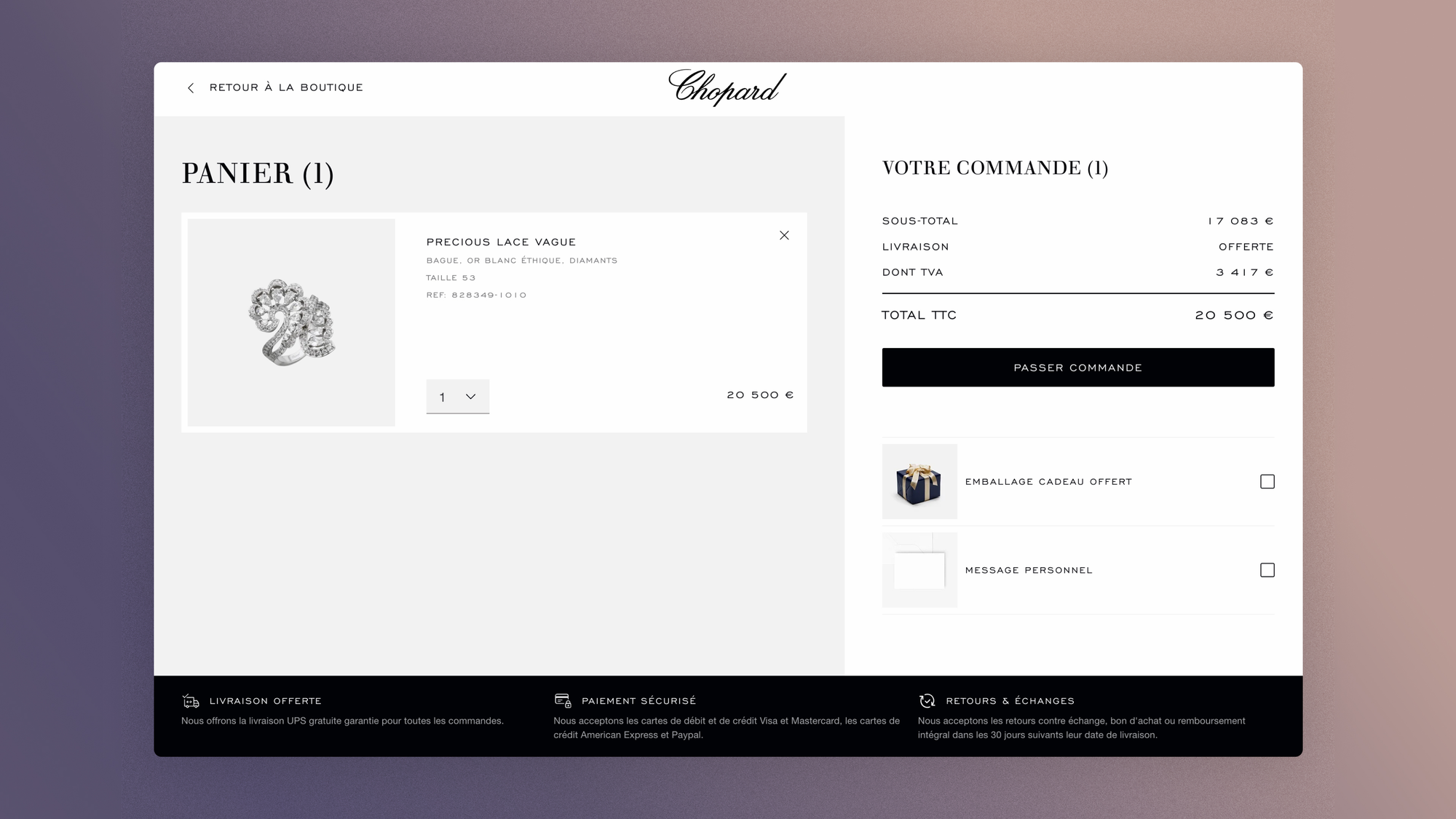
- The subtotal is visible and placed close to the main CTA, with estimated taxes and the amount of any discounts applied. The rule fits in one sentence: no new number should appear at checkout.
- All key product information is visible: title, image, selected variant, quantity, price. A size error discovered on delivery is a return; the same error caught in the cart is a click.
- The overall cart design is clear and clean. This is the page on the site that tolerates decoration the least: every element that doesn't help shoppers review or confirm the order dilutes the only two actions that matter.
- The estimated delivery date is shown when it's reliable: "Delivered by Friday" closes one of the last open questions.
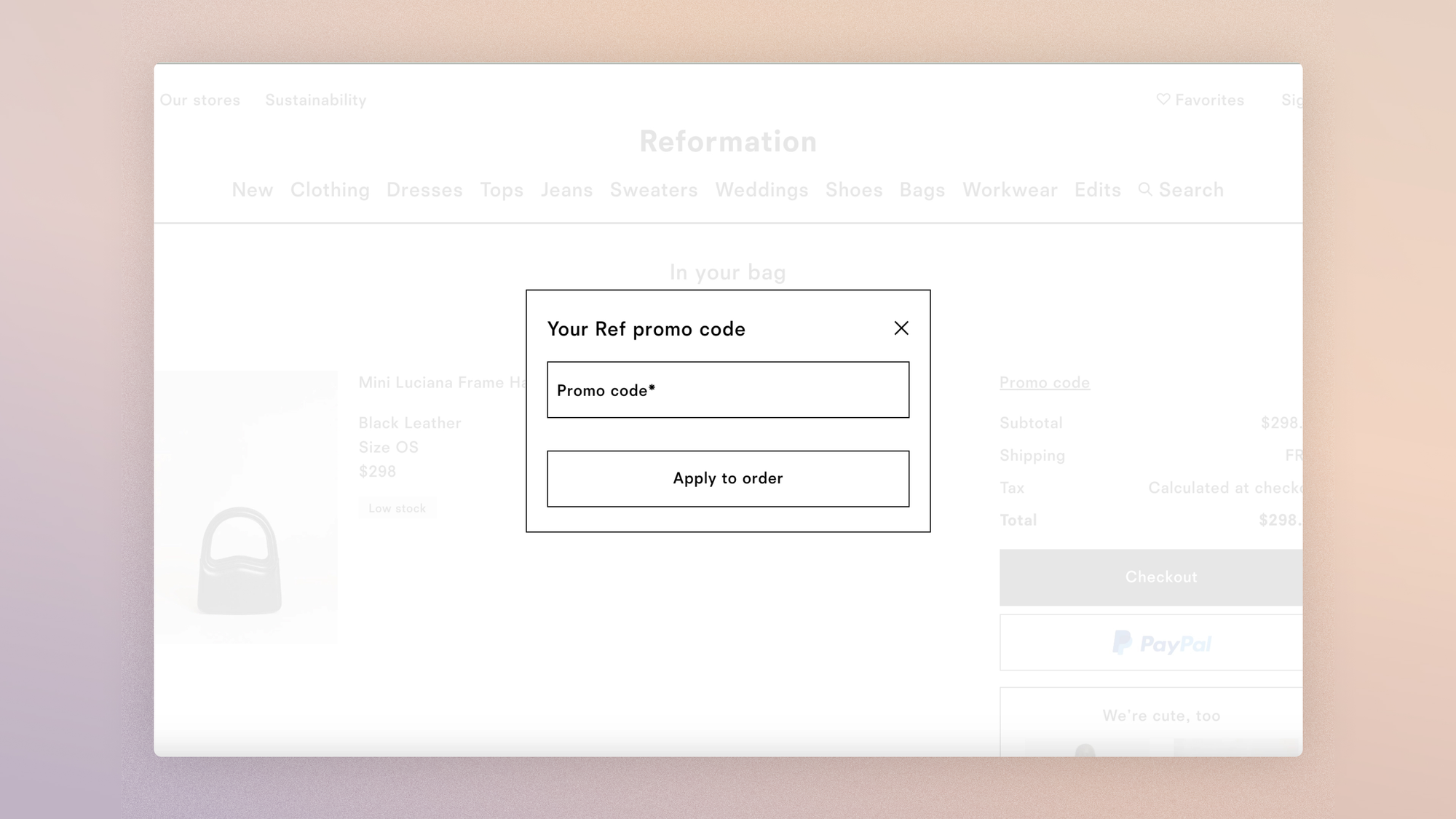
A word on the promo code field, the stowaway of this page. Visible and empty, it sends an unintended message: "there's a discount you don't have." Some cart abandonment is actually shoppers leaving to hunt for a promo code.
The figure that circulates everywhere on this phenomenon (27% of abandonments due to code hunting) deserves a closer look at where it comes from: it's from a May 2009 PayPal/comScore survey of 553 American shoppers, self-reported. It establishes that the phenomenon exists, not how large it is on your store in 2026.
Defensive options exist (a field folded behind a discreet link, codes auto-applied via URL for campaigns), and the right setup depends on your promotional policy; the audit point is to know that this field isn't neutral, and to measure what it triggers on your store.
If the promo code field is folded behind a discreet link ("Have a code?") instead of an open field, then the cart-to-checkout rate will increase, because an empty field triggers code-hunting exits that a collapsed link doesn't.
Reassurance and control: the last-doubt moves
At this stage, shoppers are no longer asking whether they like the product. They're asking whether the transaction is safe, whether they can change their mind, and whether they still control their order. The checklist answers all three.
- The cart shows reassurance elements about returns and refunds, near the CTA. This is the logistics side of reassurance, the one that answers "what happens if I change my mind"; the checkout guide covers its security twin.
- Contact and help information is clearly visible. A question that doesn't find its answer here won't come back to ask tomorrow.
- Every product is easy to remove, and quantities can be changed without a page reload. A cart that can't be edited is a cart shoppers abandon to build a new one, and the second one is rarely complete.
- On mobile, these editing actions (remove, adjust quantities) have large enough tap targets (44 × 44 px is still the minimum), and the main CTA stays visible without scrolling. A 20-pixel "−" button turns every edit into a dexterity test, and the test ends in abandonment more often than in success.
- The CTA label describes what will happen ("Proceed to secure payment"), never a "Continue" that promises nothing.
- Express payment options (Shop Pay, PayPal, Apple Pay) are available right from the cart for shoppers who have already made their decision.
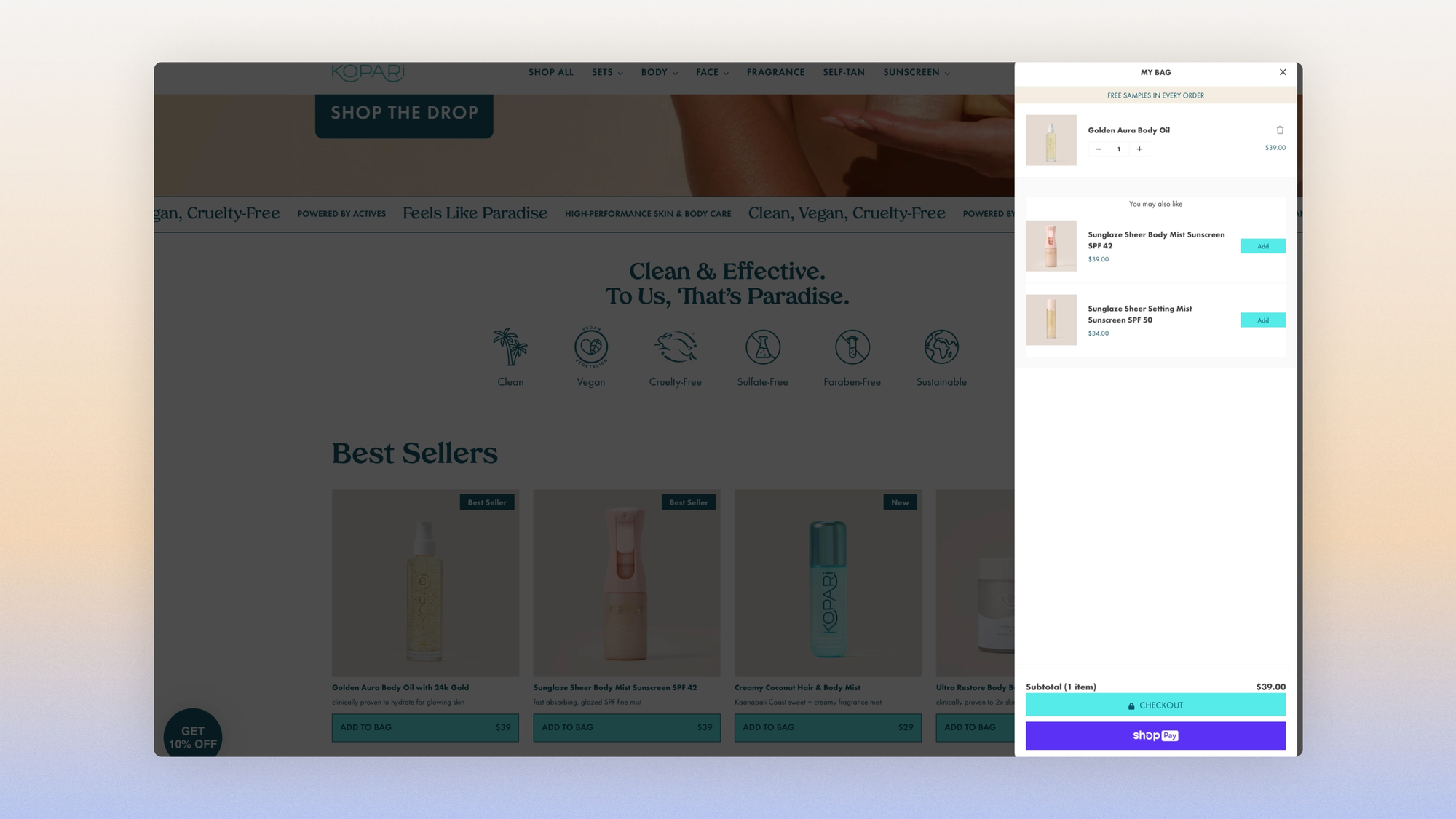
The cart must stay active when users return to the site. Persistence isn't a convenience: for long-consideration purchases, the cart is a working list that shoppers fill over several visits.
Audit it on two distinct scenarios. Returning on the same browser is handled natively by Shopify; returning from another device, or after clearing cookies, isn't without a customer account.
On decision cycles of several days, common in fashion and jewelry, this second scenario is the one that silently loses entire carts. The answer isn't the mandatory account the checkout guide condemns: it's a soft invitation ("save my cart," by email or one-click account), opt-in and driven by value, paired with abandonment flows that catch what the cookie drops.
The drivers: selling more without doing damage
The cart offers an affordable upsell or cross-sell, ideally backed by an honest urgency driver such as a discount exclusive to this step. Two execution rules: suggestion prices stay below the cart total (you complete the order, you don't compete with it), and the presentation follows the editorial logic argued in the product page guide: a suggestion that looks like your brand, not an algorithmic grid.
And a hierarchy to keep in mind: the cart is the second-best upsell spot on the site, not the first. The same offer, shown after payment rather than before, converts better and puts no risk on the order. That's the subject of the last guide in this series.
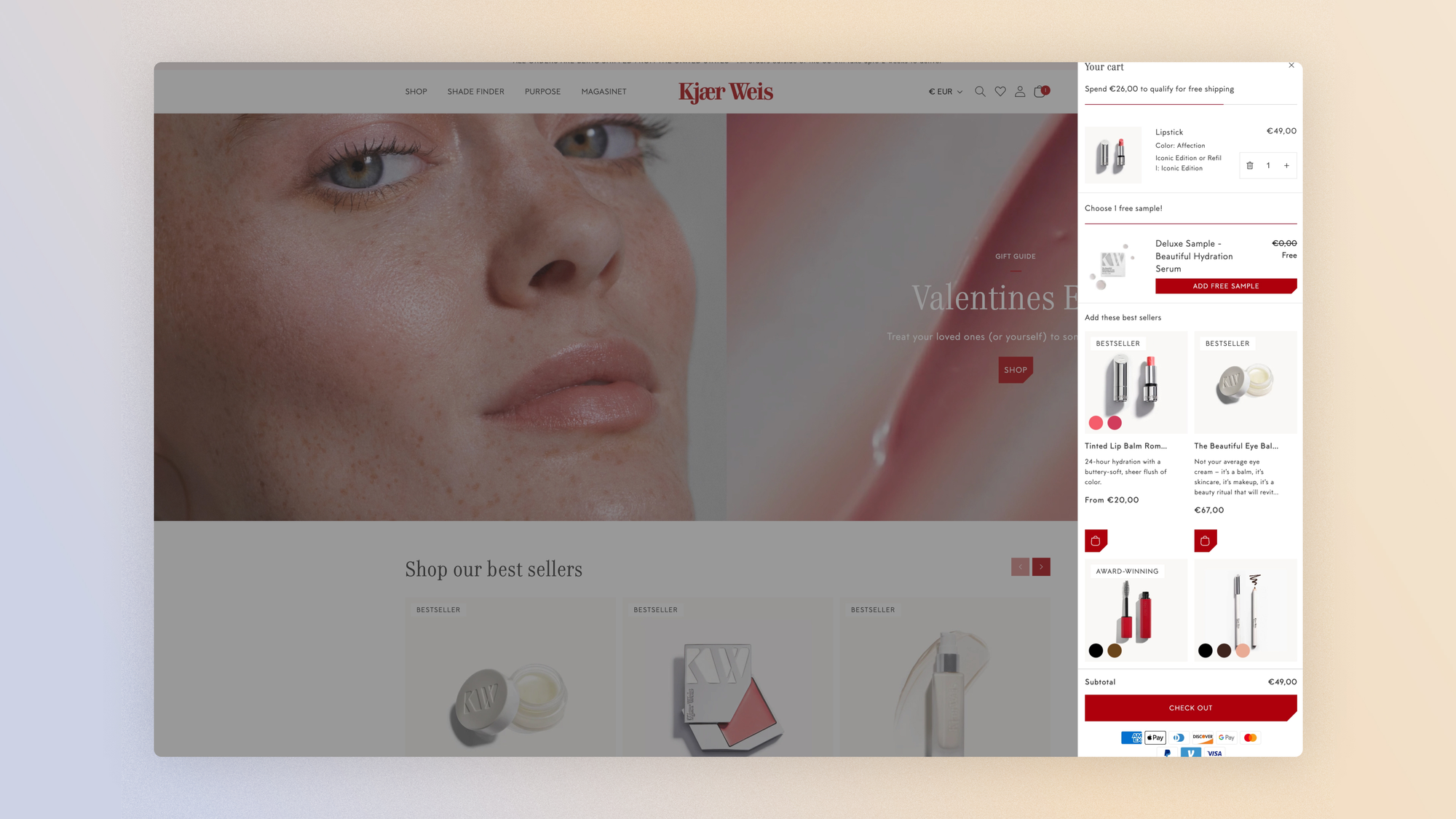
And the free shipping threshold, the king of drivers on this page, inherits every lesson from the opening case. Its position relative to the real distribution of your carts decides its effect: a threshold just above the median cart pulls upward, while one far above flattens or discourages. It's a setting that works by segment more than by store, exactly the territory of the segmentation we advocate beyond A/B testing.
If the free shipping threshold is set just above the median cart (rather than by rule of thumb), then average order value will increase without hurting conversion, because the effort required becomes a step rather than a leap. Judge it on three metrics at once: conversion, average order value, revenue per visitor. The opening case showed what happens when you only look at one.
Measuring the cart
Definition hygiene
"Cart abandonment" lumps together two different phenomena, abandonment at the cart (shoppers never open checkout) and abandonment at checkout (they start but don't finish), and the fixes have nothing in common. The rate that judges this page is the cart-to-checkout rate, at constant traffic.
Engagement
- The drawer engagement rate (share of add-to-carts followed by an interaction with the drawer: continuing, editing, going to the details) tells you whether your drawer is working or just decorating.
- You can see promo code field interactions followed by a site exit in session recordings: it's the code hunt made visible, and it's the data that settles the collapsed-field hypothesis.
- And the progress toward the free shipping threshold (share of carts that cross the threshold after the incentive is shown) measures the king of drivers on its real turf. On instrumentation: the cart-to-checkout rate can be read natively in GA4 (
begin_checkoutdivided byadd_to_cart); drawer engagement and threshold progress each need a custom event; code hunting shows up in Clarity, not in a dashboard.

Klaviyo flows
The cart also has a life after the session, and definition hygiene carries over. Most "cart abandonment flows" are really checkout abandonment flows, because the native trigger (checkout started, email already entered) is the easiest to set up.
True cart abandonment, where shoppers never open checkout, needs its own trigger on add-to-cart, and it only works for identifiable visitors: exactly the dependency the checkout guide sets up with email as the first field, and that the invitation to save your cart extends upstream.
The audit point comes down to one question: do your follow-up flows fire on add-to-cart, or only on checkout started? If the answer is the latter, the most abandoned step in your funnel has no safety net.
FAQ
Do you need a cart page, or is a drawer enough?
It depends on your order structure. For a single-product catalog or single-item impulse purchases, a drawer with a direct path to checkout shortens the journey at no cost.
Once multi-item orders dominate, the cart page becomes necessary again: it's the space for reviewing and editing the order, and removing it pushes those actions to checkout, where they cost more.
The trade-off is in your data: the share of multi-item orders decides.
Where should you put the promo code field?
Not prominently above the CTA. A visible, empty code field invites shoppers to leave the site to look for a discount.
The two defensive options: a field folded behind a discreet link ("Have a code?"), or codes auto-applied via URL for campaigns, which remove the need to type anything.
If your brand never runs promotions, the field can disappear entirely.
How do you set the free shipping threshold?
With data, never by rule of thumb.
Three inputs: the real distribution of your carts (the effective threshold sits just above the median cart, so the effort required stays a step), your shipping margin (the threshold must stay profitable once shipping is absorbed), and a test measured on three metrics at once: conversion, average order value, revenue per visitor.
A threshold set without testing can destroy value while still lifting add-to-cart rate; we measured it.
Get the complete checklist
The cart checkpoints, with their impact and cost scores, explanations and visual examples, are part of the 194-point CRO checklist, available in a duplicable Notion database reserved for Conversion Club members.
 Jérémie Werner
Last guide in the series: post-purchase, the most profitable page on the site and the least worked on.