It's the question every e-commerce merchant ends up asking: my Shopify and GA4 data don't match. Which one do you trust? Which tool should you use to make decisions?
Don't tear your hair out over it. Trust me, it's not a pretty sight from the other side of the screen...
The short answer is one you won't like: you need to use both tools, but not for the same things.
If you don't understand why they diverge, you risk making decisions based on hot air.
This article goes further than a simple comparison: we'll break down the technical mechanisms behind these gaps and give you a clear decision framework.
Let's start simple and concrete: you're not alone!
(It's therapeutic. It feels good to read that.)
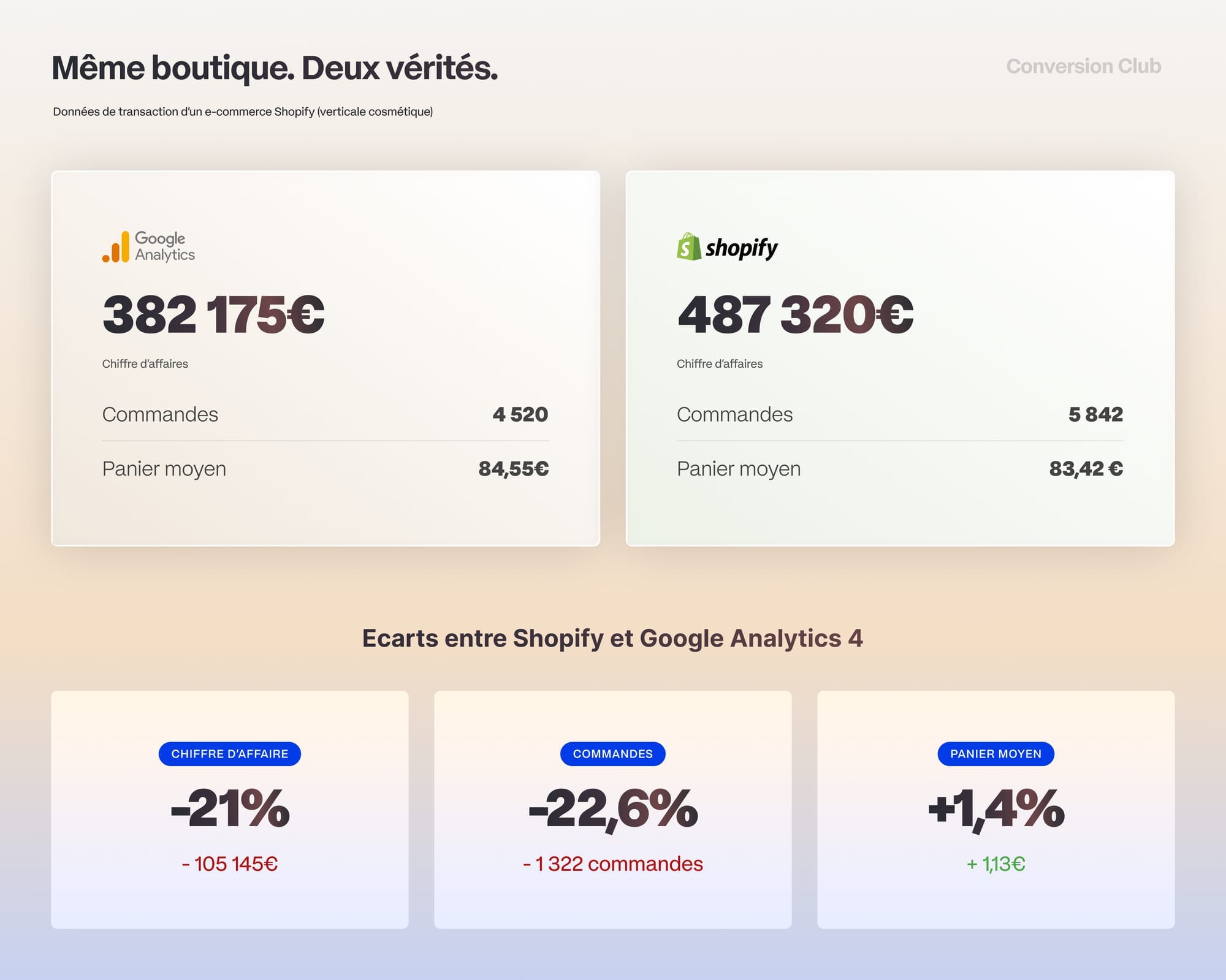
Here's a perfect illustration of the problem: a cosmetics store with €5M in annual revenue and numbers that don't add up. The revenue gap between Shopify and Google Analytics is 21.6%. Why?
As CRO experts, we always answer these questions the same way:
- We explain the nature of the data from both sources: what they have in common, how they differ, and what makes each one distinct.
- We quantify the gap between the two sources.
- We fix the tracking infrastructure if needed to maximize data collection.
- We teach teams a dedicated decision framework to match the right data to the decisions they need to make (🎁 spoiler alert: you can download it at the end of the article).
We're going to do exactly the same thing in this article, so let's start by understanding our problem.

Why the numbers diverge: browsing data vs. transaction data
Before we talk about Shopify and GA4, you need to understand that e-commerce is a world where several types of data flow in parallel.
In our example, the Shopify environment had been corrupted by a faulty installation of the CMP (Cookie Management Platform). We'll follow this case throughout the article.
The question the merchant asked me is crystal clear:
I have 10 orders in Shopify and 8 in GA4,
WTF?

The answer comes down to data types: your Shopify actually works in two different ways.
On one side, Shopify works like a point-of-sale system: it records transactions, stores customer addresses, tracks delivery. It aggregates transactional data. That data has to be complete and precise.
On the other side, its reporting section isn't about transactions but behavior. Shopify analyzes how people interact and browse. The data shows a trend, much like an IPSOS poll.
In practice, these are fundamentally different, and the problem is that the merchant was comparing orders in the back office (transaction data) with visits that led to a purchase in the reporting (browsing data).
Let's use an image to explain the difference between the two types of data:
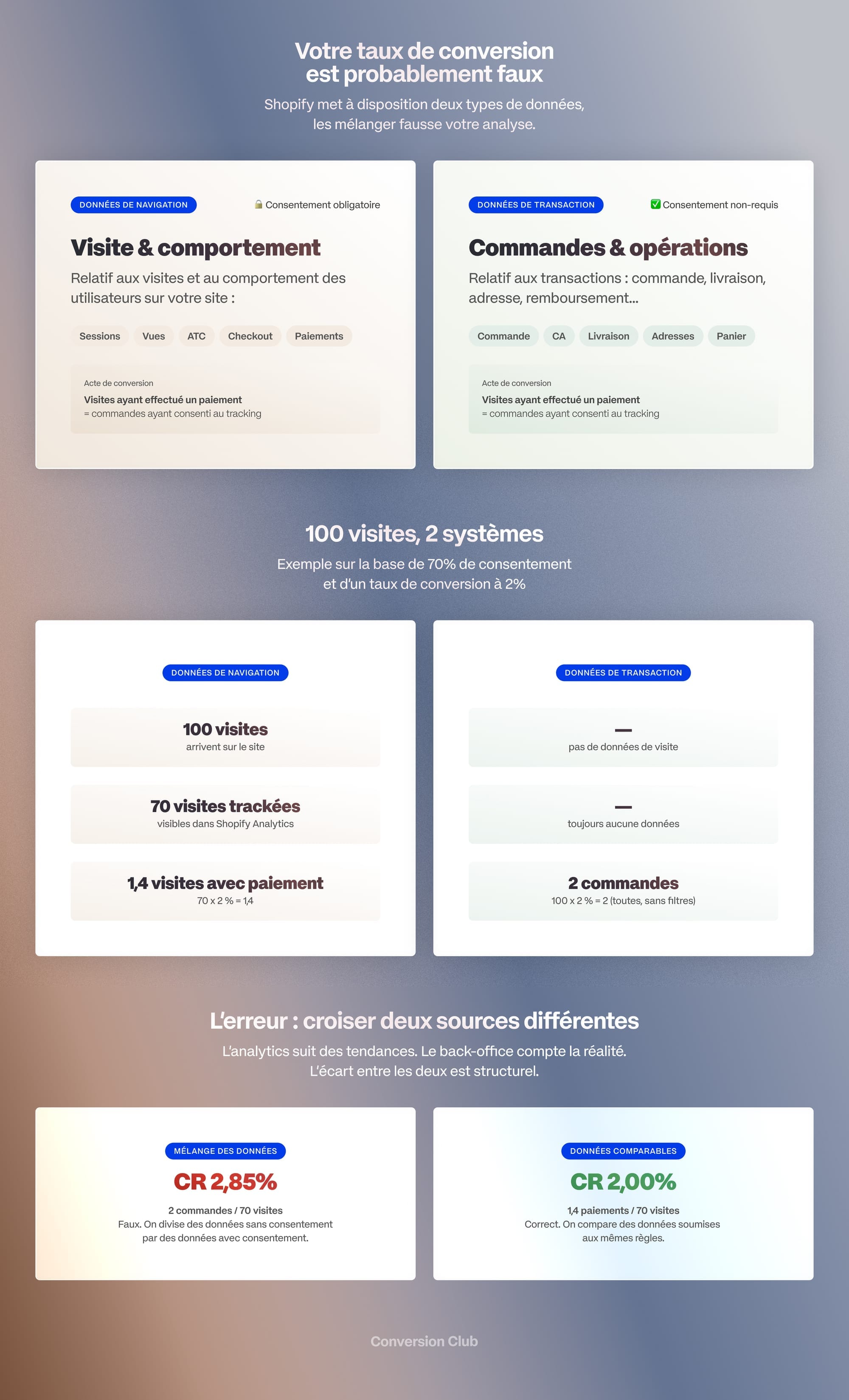
The ideal data pair: Transaction + Browsing = ❤️
Now that you understand the fundamental difference between browsing data and transaction data, let's talk about why you need to use them together.
Why GA4 complements Shopify (and vice versa)
Shopify Analytics exists. It even gives you reports on traffic, sources and behavior — so why bother with GA4?
Because Shopify Analytics is currently much more limited than Google Analytics 4, which is a tool dedicated to behavioral analysis. Here's the difference at a glance:
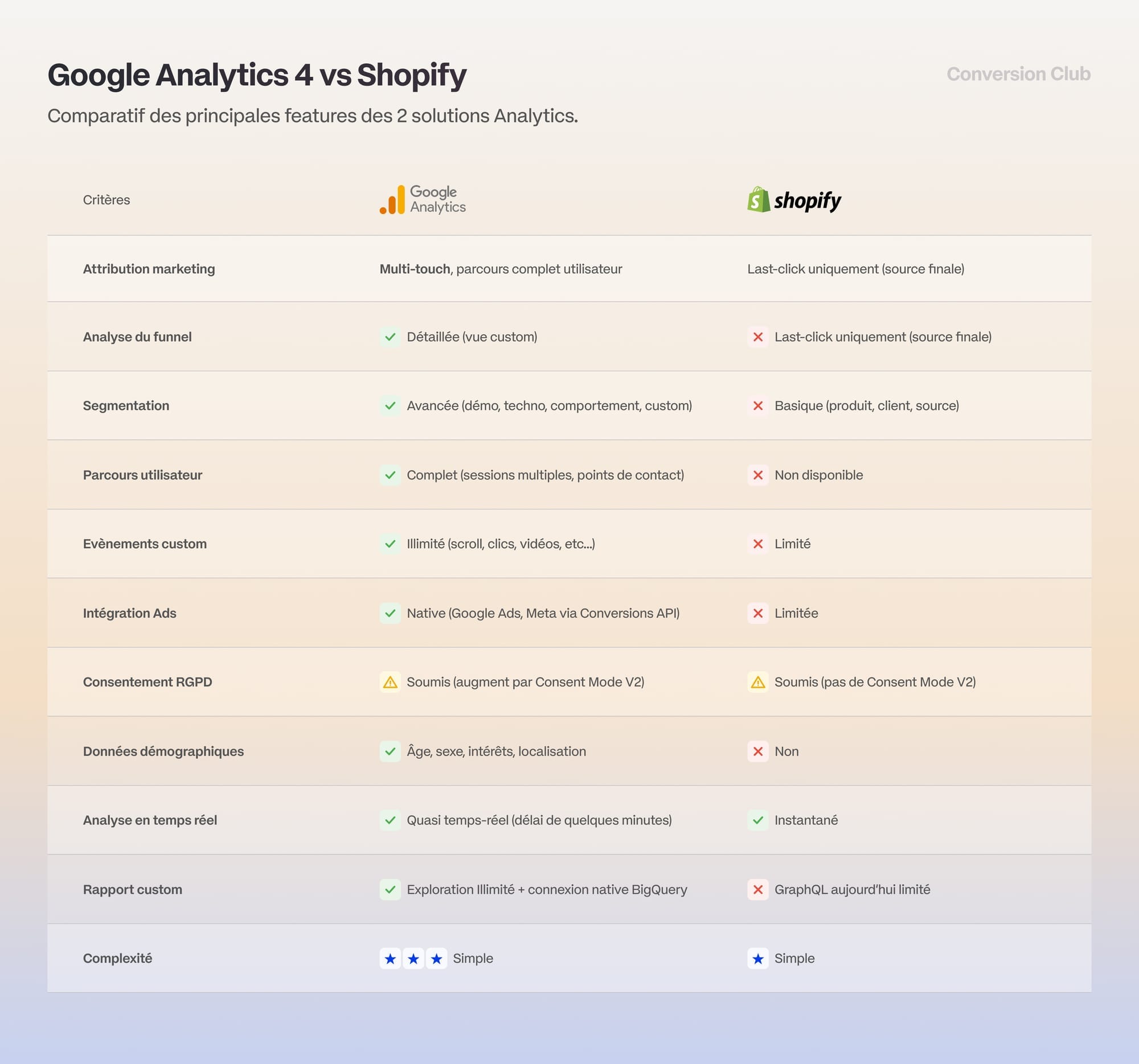
With its advanced features, GA4 gives you finer granularity for browsing data. For transaction data, however, Shopify remains your accounting source of truth, because that data isn't subject to any limitations.
Let's walk through a practical example
At the start of March, you launch a new spring-summer collection. As of March 22:
What Shopify tells you (transaction data)
- "You sold 150 products from the new collection"
- "Your average order value is €85"
- "You generated €12,750 in revenue"
What GA4 tells you (browsing data)
- "45% of buyers first visited your Instagram page"
- "On average, it takes 2.3 sessions before a purchase"
- "Visitors who watch the product video convert 3x more"
- "68% drop off when choosing a size"
Without Shopify, you don't know how much money you actually made.
Without GA4, you don't know WHY you made it.
Ending the "single number" myth: stop trying to make everything match!
"How do I get Shopify and GA4 to show exactly the same revenue?"
Wrong approach.
Trying to get the same revenue in Shopify and GA4 is like expecting your bathroom scale and your tape measure to show the same number. They're two different tools measuring different things. Shopify counts the money that HITS your bank account, while GA4 counts shopping BEHAVIORS on the web.
The real question to ask:
"Am I collecting enough data in GA4 to make informed marketing decisions?"
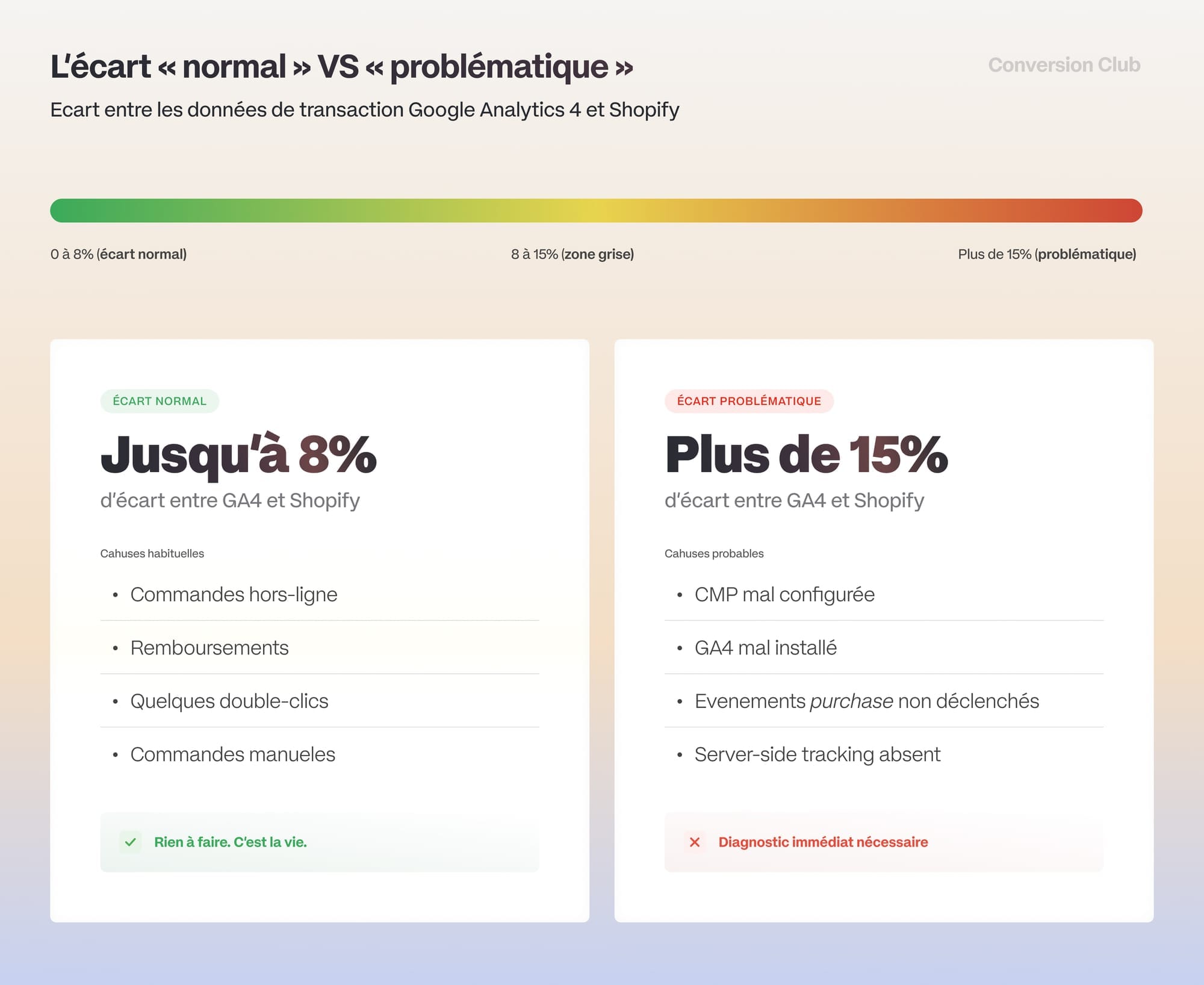
The "normal" gap vs. the "problematic" gap
This is where you need to be sure you have large enough samples to make decisions on representative data. It's the basic rule of statistical validity.
The goal of your setup is to collect as much data as possible, legally.
Your tracking infrastructure isn't something vague or "let's try it and see if it works." If your collection falls short, you can take concrete steps to fix it.
To keep it short: if you're capturing more than 90% of your data, you have nothing to do. Otherwise... make some trade-offs.
Consent Mode V2: GA4's main strength
Before we talk about Consent Mode, let's identify the culprits that make you lose data:
Poorly managed consent (CMP)
That's the case for our cosmetics merchant: a misconfigured CMP (Cookie Management Platform) that blocks GA4 from firing. The result: a 21.6% revenue gap.
Ad blockers
AdBlock, Brave, Firefox with Enhanced Tracking Protection... Between 20% and 40% of your visitors use tools that block GA4 by default.
Outdated client-side tracking
When GA4 runs only in the browser (client-side), a single blocked JavaScript file is enough to lose all the data from that session.
Each of these problems causes data loss if it's only partially fixed. Still, GA4's advantage here is that it has had Consent Mode V2 since March 2024.
Before it, data collection was binary:
- No consent = ZERO tracking
- The result: you lost between 30% and 60% of your traffic in GA4.
In our example with €5M in annual revenue, that could mean €1.5M to €3M in revenue invisible in your acquisition reports. What changed is that Google introduced a two-speed, GDPR-compliant system.
Without consent
Google still tracks, but in degraded mode:
- No cookies
- No personal data
- Only anonymized "pings"
- Google uses conversion modeling to fill the gaps
With consent
Full tracking, as before:
- First-party cookies
- Individual-level data
- Precise attribution
Here's what that changes in practice:
| Situation | Recovery rate | Out of 10,000 visitors who decline |
|---|---|---|
| Without Consent Mode | 0% | 0 visitors tracked |
| With Consent Mode V2 | 70-85% | 7,000 to 8,500 visitors modeled |

The decision framework: it's a gift!
Now we get to the actionable part of the article. You now know which data does what and why, so you can match your sources to your decisions.
To help, I've put together a framework that matches your data sources to the type of decision you make every day.
Download it here ↓

Decision Framework: Shopify or GA4?
We can make peace now 💙
You now have everything you need to understand and use the Shopify/GA4 complementarity:
Now that you know that, you can finally stop tearing your hair out and make decisions based on the right data.
And, as a bonus, sleep a little better at night. 😴
If after reading this article you're thinking, "OK, I understand the problem, but I need help fixing it," talk it over with the community in the comments ;)
We'll be there to answer and help!
💐