Most CRO funnel audits start with UX hypotheses, a search for best practices and a quick look at heatmaps or session recordings.
That's a mistake.
Before I look at what to optimize, I check that my data is reliable. Then I look at the funnel as a whole, and only after that do I dive into a step-by-step analysis.
This approach comes from the mechanics of the Journey pillar, one of the five in the Prisme, the framework that structures how we audit CRO programs.
Prepare the ground before looking for ideas
First, I always check that my data is reliable, and that takes some groundwork.
That means I make sure that:
- My Shopify reports exclude bot traffic (so I can compare them with GA4)
- Sales are showing up in GA4
- There are no inconsistent rates in my funnel
- My GA4 captures at least 70% of the data
Bots pollute your data
I regularly see cases where an entire program gets called into question because bots flood the statistics.
If you count 1 sale for 100 sessions and add 50 artificial sessions tied to no sale, your CVR is going to look bad.
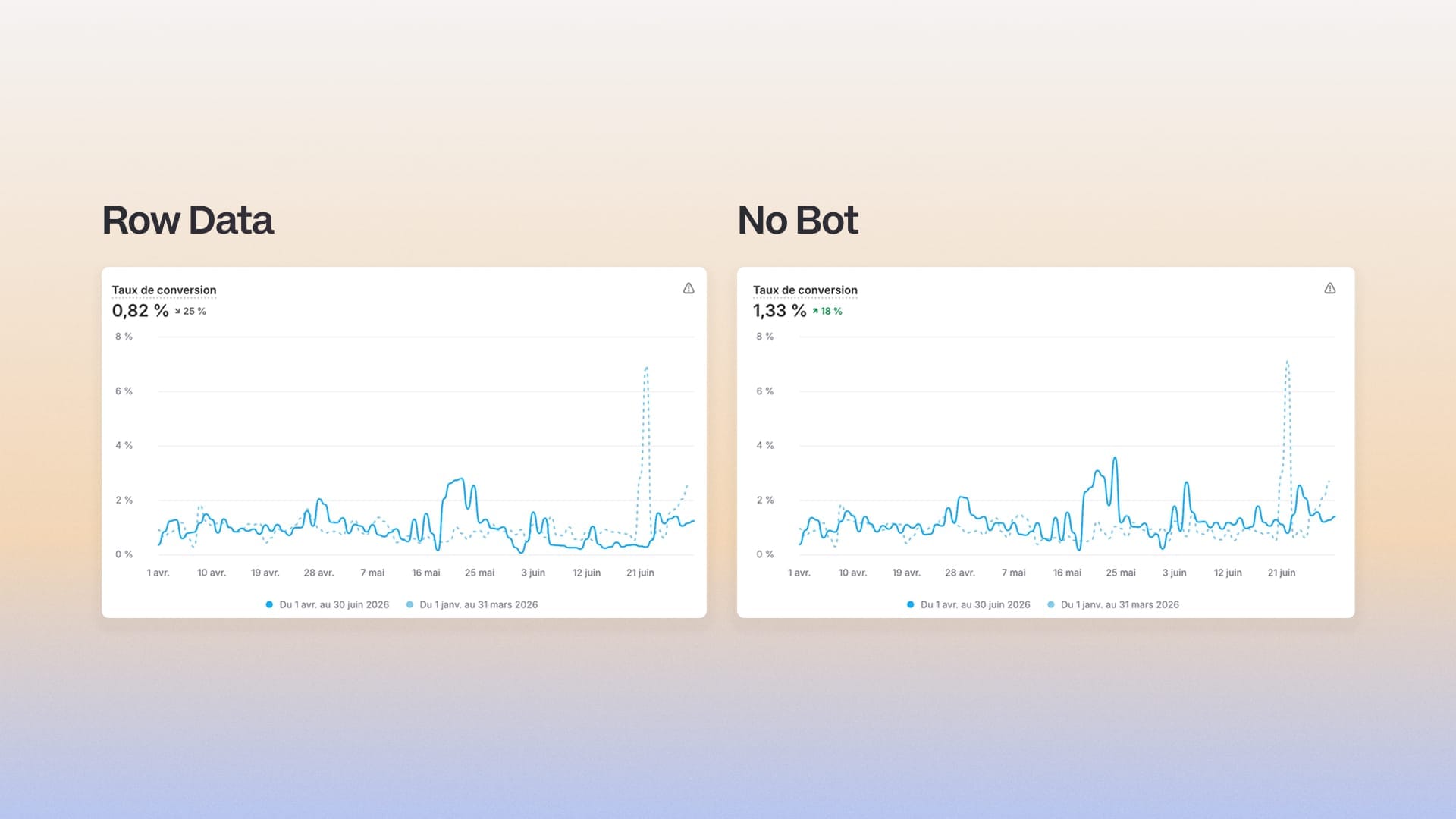
In GA4, this is turned on by default for new properties.
If I still see unusual traffic, it's probably unlisted bot traffic. I then filter by segment in Explorations and exclude internal IPs from Admin > Data filters.
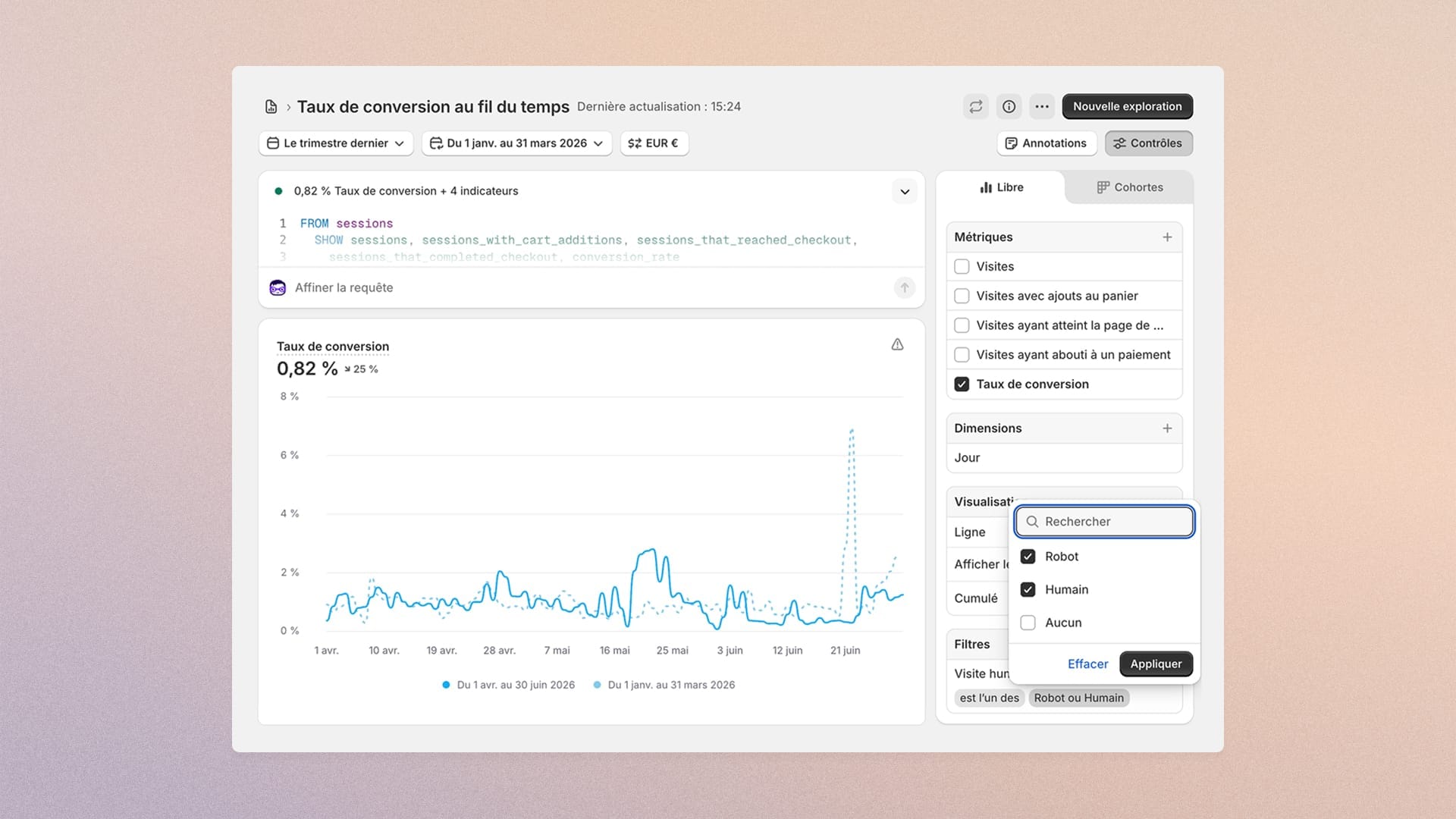
In Shopify, it comes down to filters, using the "human or bot visit" field.
Make applying it a habit.
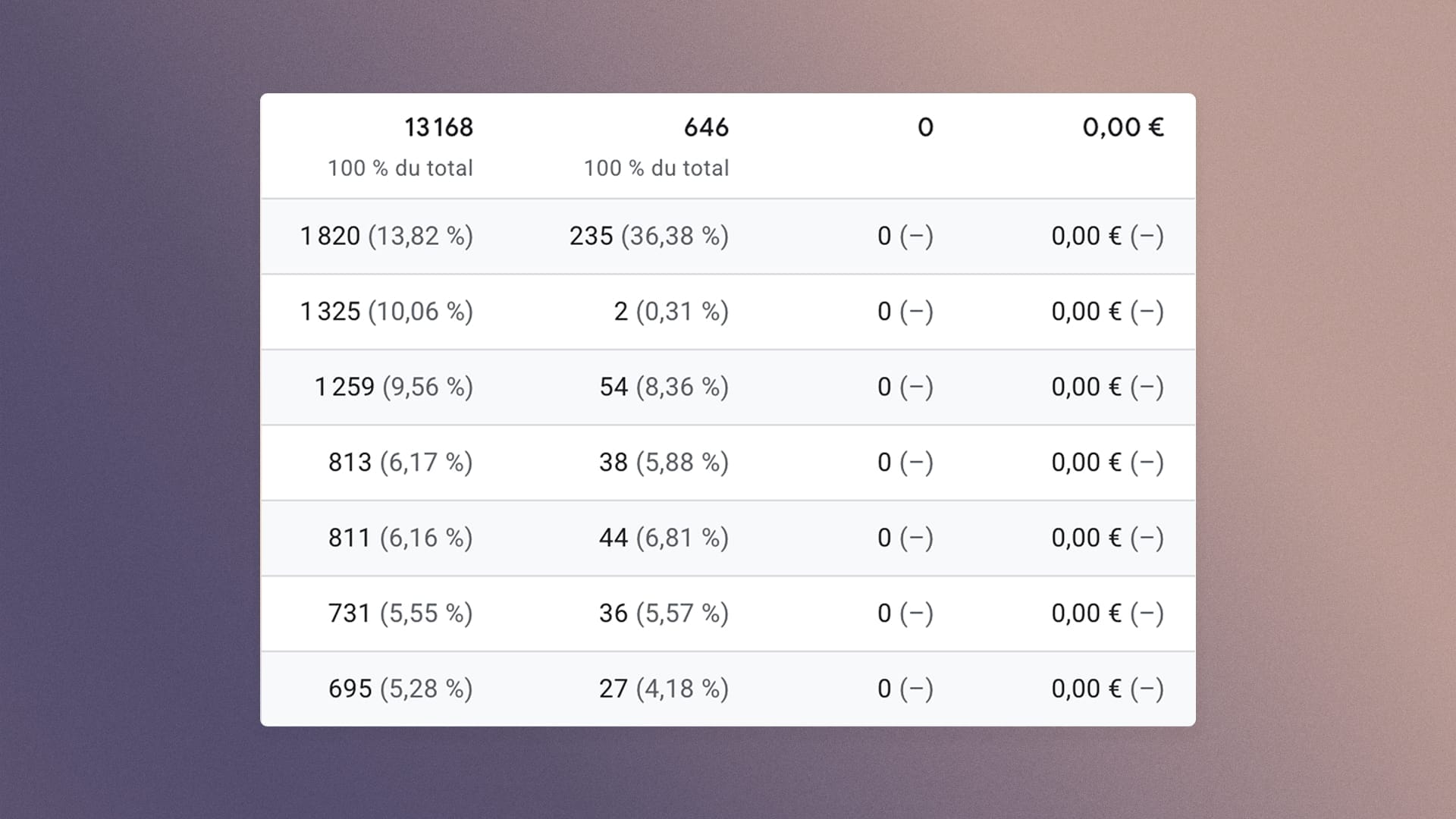
A monetary value must show up in your GA4
It's only logical. You run an e-commerce store, so if value and currency don't come through, you have a problem. That's why I always check this when I'm given access to a new property.
To do that, I open the Ecommerce purchases report and simply check whether the euros (or whatever currency) come through.
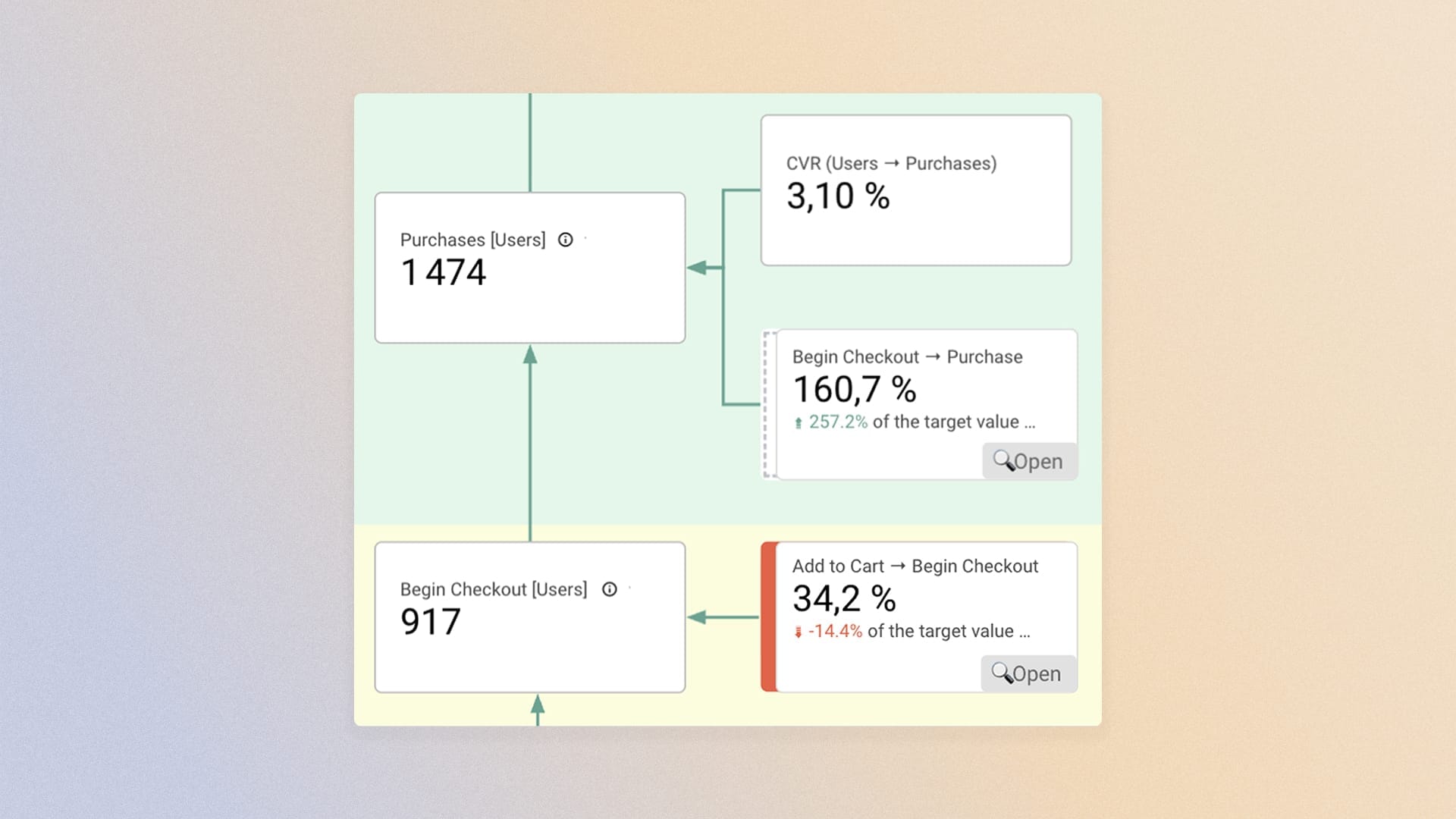
Inconsistent conversion rates are a dealbreaker
By nature, a 120% rate in an e-commerce journey is an inconsistency.
In a funnel, you take volume away at each step. You don't add any.
So I check that no rates look abnormally high.
70% matching is my limit, but that's just my view...
The last thing I look at is how much data GA4 manages to capture compared with my transaction data.
I've written a full article on this, and I invite you to read it:
 Rémi Migliasso
Once the data is validated, you can start analyzing.
I always work from macro to micro: first the big picture of the funnel, then segmentation, and finally a step-by-step zoom.
The order matters, because diving straight into the details without seeing the big picture is like diagnosing without examining the patient.
Let's start with the big picture
The first part of the analysis is to step back as far as possible and look at the whole journey. To get the most accurate view, I always take two samples.
- The first sample covers the last 30 days. It gives me the most current snapshot and lets me rule out possible biases caused by major UX changes.
- The second sample is there to break the seasonal effect. If the first sample was in high season, I take its counterpart in low season, and vice versa. This lets me rule out timing bias, which can be very strong for some brands.
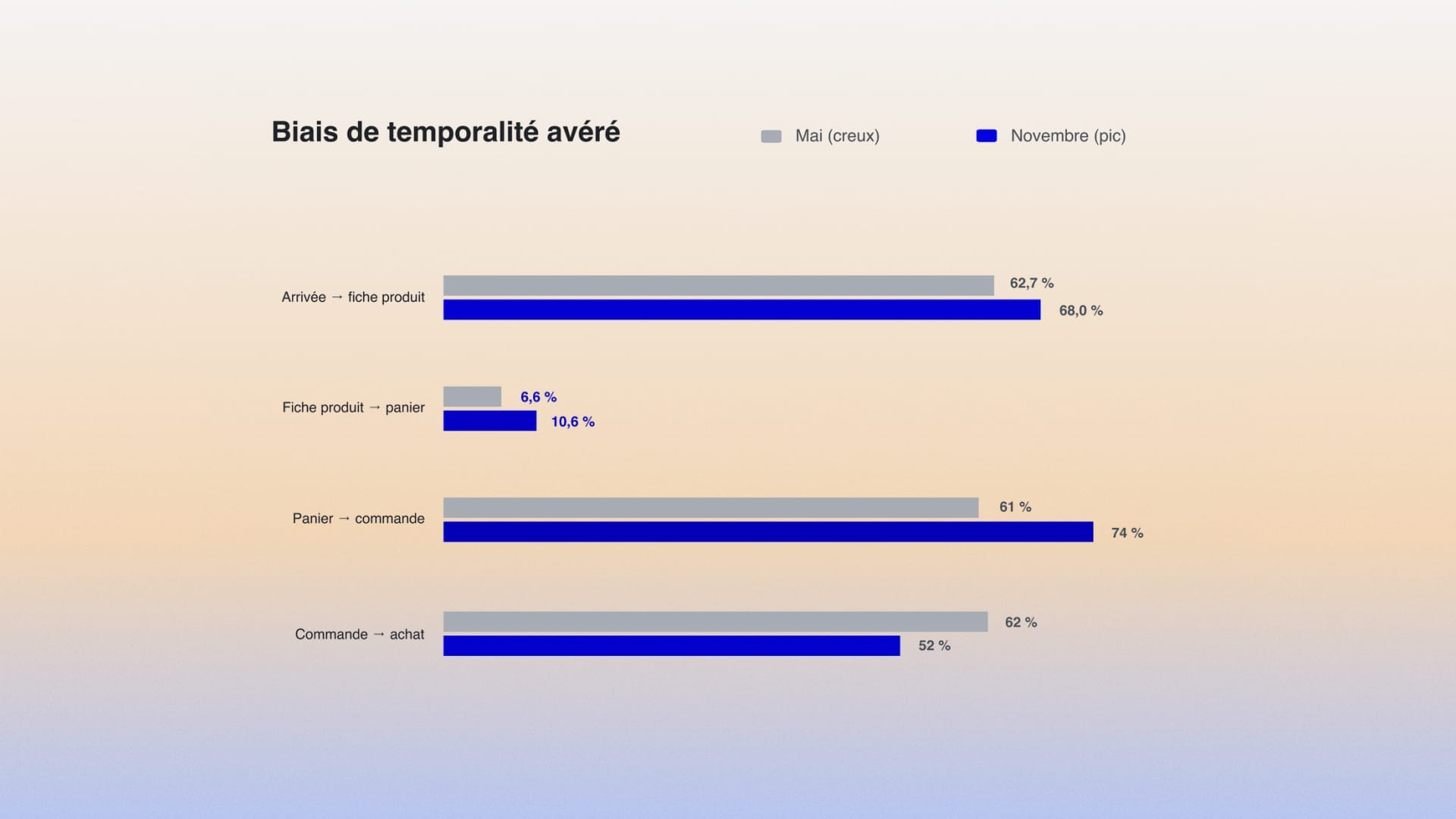
Then the mechanics are fairly simple. I retrace the path my users take, counting only one event per user so rates don't get inflated. A user carries a single product view event with them, even if they viewed 8 products.
I then analyze how many users move from one step to the next (Arrival → Product view → Add to cart → Checkout → Purchase). That's the drop-off.
Then I compare this data with industry averages by vertical.
Here's a preview of the benchmark:
| Step | Fashion / Luxury | Beauty | Food & Beverage | Electronics |
|---|---|---|---|---|
| Session → Product view | 40-45% | 45-50% | 50-55% | 35-40% |
| Product view → Add to cart | 6-8% | 10-12% | 12-15% | 5-7% |
| Add to cart → Checkout | 30-35% | 35-40% | 40-45% | 28-33% |
| Checkout → Purchase | 45-55% | 55-65% | 60-70% | 50-60% |
| Final conversion rate | ~1-2% | ~3-4% | ~4.5-6% | ~1.5-2% |
For the session → Product view step, I just specify the type of page the user landed on. Was it the homepage, a collection, a product page, a blog page?
This gives a slightly more precise view of a step that's otherwise too broad.
Depending on the answer, you're reading a different problem: an entry through the homepage points to homepage trade-offs, while an entry through a collection points to category trade-offs.
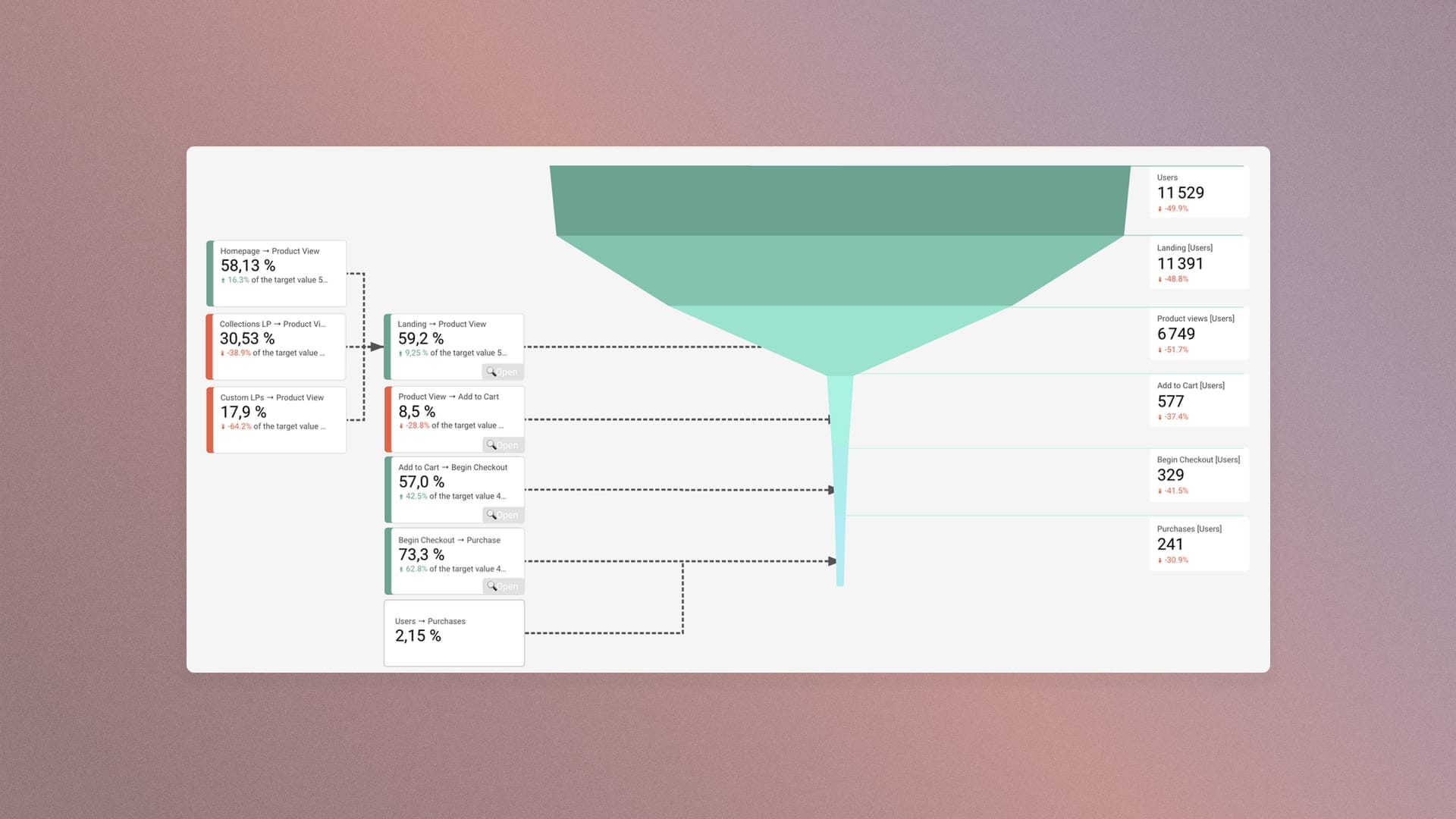
Now let's segment the data
I now have a view of which journey steps work and which struggle. To deepen my understanding, I'll now segment the journey by several dimensions. Here are the main ones.
- By device category: mobile/desktop/tablet/TV
- By source/medium
- By landing page category
- By visitor type
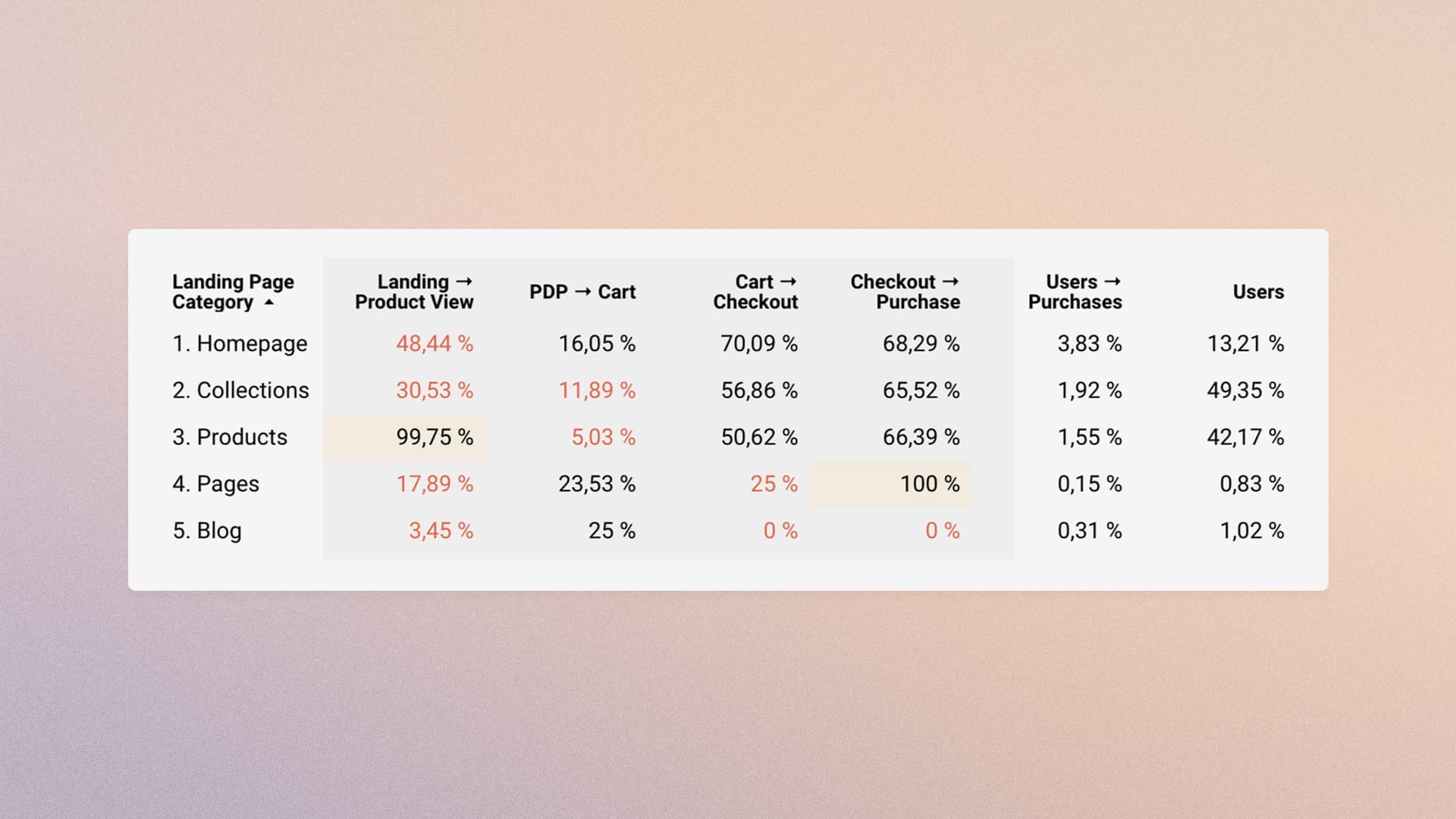
For each of these dimensions, I apply the segmentation to the journey. We can frame this step as questions, for example:
- How does the journey behave if we isolate mobile?
- How does the journey behave if we isolate paid (cpc)?
- How does the journey behave if we isolate traffic that lands on a collection page?
- How does the journey behave if we isolate traffic that comes to the site for the first time?
- And so on...
This view is still macro (the entire funnel in one picture). It shows us that segments don't all behave the same way. Some segments are larger than others, or more engaged, or more profitable...
Informed by what each segment taught me about the big picture, I then dive into the data.
Going into each funnel step
From here, each step has its own body of knowledge: the drivers of the product page for the move to add to cart, those of the cart for the move into checkout, and those of the checkout for the final purchase.
The quantitative data tells you where it leaks. These audits tell you what to look at on the ground.
So now I naturally dig deeper into my data to find where to intervene.
To do that, I use a new set of second-level metrics:
| Level | KPI |
|---|---|
| 1 | Landing → Product view |
| 1 | Product view → Cart |
| 1 | Cart → Checkout |
| 1 | Checkout → Purchase |
| 1 | Users → Purchase |
| 1 | % Users |
| 2 | Collection → Product view |
| 2 | Homepage → Product view |
| 3 | Revenue per user |
| 3 | Revenue per user vs. average |
| 3 | Users → Purchase vs. average |
| 3 | Purchases (count) |
| 3 | Average order value |
| 3 | Bounce rate |
These KPIs then help me analyze each step of the journey with dimensions specific to each one.
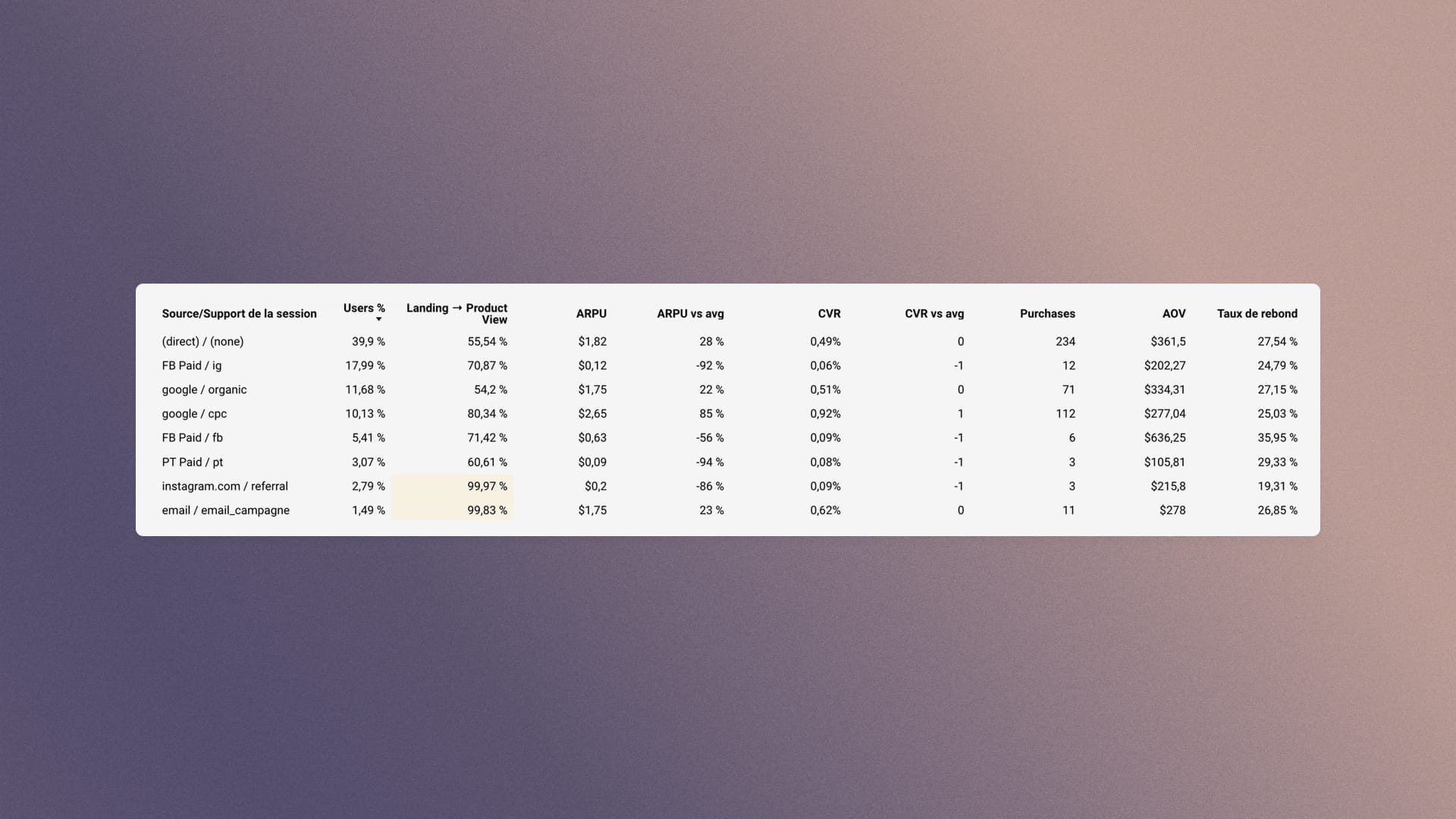
Dimensions explored for the Landing → Product View step
- By landing page
- By source/medium
- By user type
- By device category
Dimensions explored for the Product View → Add to Cart step
- By item name
- By product landing page
- By source/medium
- By user type
- By device category
Dimensions explored for the Add to Cart → Begin Checkout step
- By default channel group
- By device category
- By user type
Dimensions explored for the Begin Checkout → Purchase step
- By default channel group
- By device category
- By user type
At the end of this process, I have a precise quantitative picture of the funnel: where it leaks, in which segment, at which step.
Better than a list of recommendations: a map.
I know which steps underperform against their vertical's benchmarks. I know whether the problem is widespread or concentrated in one segment (mobile, paid, new visitors). And I know in what order to prioritize the work.
This map then feeds the test backlog. We can now also draw on our 194 checkpoints, scored by impact and cost, rather than relying on intuition or generic best practices.
Our thinking is data-driven, segmented and contextualized.
A funnel that leaks on mobile in paid traffic can come from the Journey, through UX, performance or readability, or from Acquisition, through poorly targeted audiences or an ill-suited landing page. The numbers locate the symptom. Reading across the five pillars of the Prisme identifies the cause.
In an upcoming article, I'll cover the Acquisition pillar: how I assess traffic quality, channel by channel, before even looking at what it does on the site.