The checkout is the only page on the site where the customer has already said yes. The product is chosen, the size is selected, the cart is confirmed. All that's left is not to change their mind, and yet that's exactly what stores keep doing: every form field is a question asked to someone who is already holding out their credit card.
Figures from the Baymard Institute show how much is wasted: nearly one in five shoppers has abandoned an order because the checkout was too long or too complicated, yet most sites could cut the number of form elements in their checkout by 20 to 60%.
The same institute estimates that a large e-commerce site can gain about 35% in conversion from improving its checkout design alone. Not by adding anything. By taking things away.
A data point from our own audits, to show what's at stake. On a Shopify store audited in March 2026 (95,332 sessions analyzed), the checkout met its benchmark: 54.9% of initiated checkouts went through to payment, above our 40-50% threshold.
The leak was right ahead: 54.4% of carts never initiated checkout. And the audit's top two causes were checkout decisions, not cart decisions: mandatory account creation, and shipping costs that stayed hidden until checkout. The page converted; the conditions for entering it put people off.
This guide is the third in our CRO audit series, built on our checklist of 194 checkpoints: about thirty for the checkout alone, with forms accounting for half of them.
See the article:
 Jérémie Werner
The method is the same as in the pillar guide: checkpoints scored by impact and cost, and hypotheses ready to enter your testing program. One note on scope before we start: this guide audits the domestic checkout.
The international side (currencies, customs, cross-border fees, that moment when the price changes) has its own guide, Selling Internationally on Shopify, because the friction there is of a different kind.

The Shopify Playing Field: What You Can Test, What's Locked
Before going through the checklist, a reality that most checkout optimization guides ignore: on Shopify, you don't control everything, and that's good news in disguise.
The Shopify checkout is standardized and continuously optimized by the platform. According to a study Shopify commissioned from a major consulting firm, Shop Pay lifts conversion by up to 50% compared with a guest checkout, and its mere presence as an option improves lower-funnel conversion by about 5%. The figure comes from the vendor, so read it with the usual caution, but the logic holds: an identity wallet that prefills everything automatically removes half of this checklist.
In practice, the playing field breaks down like this:
- On all plans, you control the settings: guest checkout, optional fields (phone, second address line), express payment methods, basic branding (logo, colors, typefaces), and the content of adjacent pages. Post-purchase extensions and compatible app blocks are also available without Shopify Plus.
- On Shopify Plus, Checkout Extensibility opens up deep customization: UI extensions, the Branding API, Shopify Functions for discount and shipping logic. This is where in-checkout upsells and custom trust blocks get tested.
- On no plan can you rewrite the underlying mechanics of the form, and that's fine: Shopify has already applied most of this guide's rules for you.
The strategic consequence: on a standard plan, checkout optimization happens mostly around the checkout (the trust built upstream on the product page and cart, the settings you turn on or off); on Plus, it happens inside it too.
The audit that follows serves both cases: check what Shopify already does for you, and identify what's still your responsibility.
Forms: Every Field Is Paid for in Cash
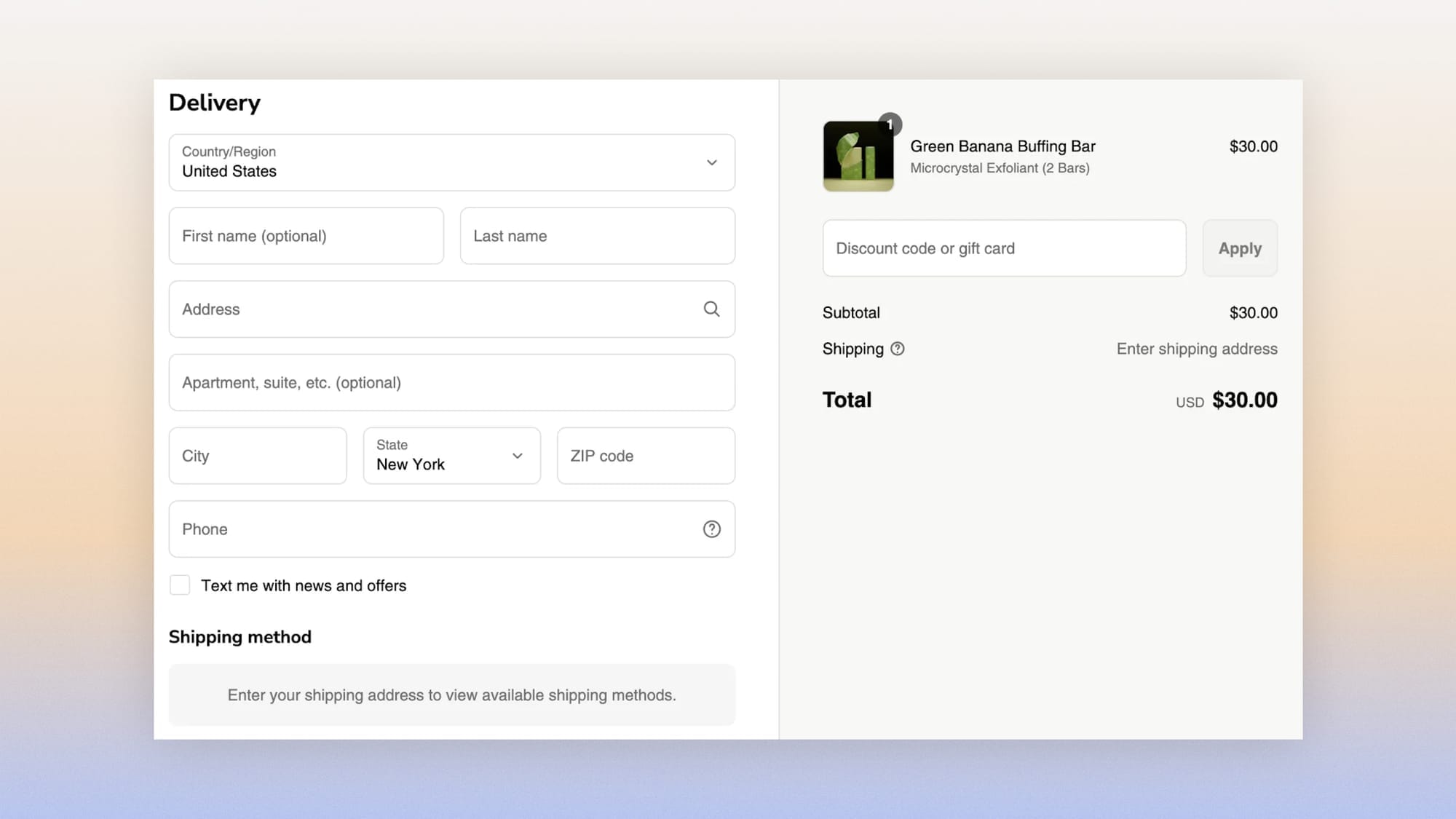
Half of the checkout checkpoints concern forms. Four moves sum them up.
Reduce
- The checkout contains only the fields strictly necessary to complete the order. Every extra field must justify its existence with useful data, not marketing curiosity.
- The layout is as simple as possible, ideally a single column. The eye moves down, not zigzag.
- Users never have to enter the same information twice.
- A single address can serve for both shipping and billing, in one click.
Guide
- All fields have permanent labels, not just placeholders that vanish as soon as you type. A vanished placeholder is a question you have to ask again.
- Required and optional fields can be told apart at a glance.
- Fields are validated as people fill them in, with a clear indicator, rather than in a barrage of errors on submission.
- Error messages are explicit, and the field concerned is immediately identifiable.
- When an error occurs, nothing gets erased: nobody should have to re-enter an entire form because of one mistyped ZIP code.
- Moving from field to field works with the keyboard, and payment fields have accessible labels. Beyond UX, this is now a legal requirement: the European Accessibility Act has covered online transactional services since June 2025, and a keyboard trap on the payment modal is exactly the kind of defect it targets.
Speed up
- The address field relies on an autocomplete database. Google claims a gain of about 30% in completion speed for autofilled forms (vendor figure, use caution), but the second benefit is the most profitable: fewer address errors, so fewer failed deliveries and support tickets. Autocomplete doesn't just save time, it protects your margin.
- The city fills in automatically from the ZIP code, and vice versa.
- On mobile, the right keyboard appears for each field: numeric for the ZIP code, a keyboard with "@" and ".com" for the email.
- A character limit applies to fields where it makes sense.
Explain
- When a phone number is requested, the reason is given ("for delivery"). Information requested without justification feels like an intrusion; the same information, justified, becomes a service.
If we turn on real-time field validation with a success indicator, then the completion rate of the information step will increase, because immediate correction is cognitively cheaper than a list of errors at the moment people thought they were done.
Trust at the Moment of Payment
Payment is the point in the journey where the customer's brain switches modes: it stops dreaming and starts verifying. Auditing this area means giving them no reason to go verify elsewhere.
- Reassurance works on two distinct registers, and each has its place. Security signals (encrypted payment, a recognized provider) answer "is this site safe?" and belong at the payment field. Logistics signals (a one-line return policy, an estimated delivery date) answer "what happens if I change my mind?" and belong at the CTA. Two different objections, two placements, one screen.
- The credit card field sits on a slightly contrasting background that sets it apart from the rest of the form.
- Visual aids explain the card fields (where to find the security code).
- Choosing a payment method is comfortable on mobile, where most transactions happen.
- Before the final purchase, an order summary appears: products, amounts, address. You don't sign what you can't reread.
- The privacy policy is accessible and easy to understand.
- Help options exist (chat, email, phone): a question that goes unanswered at this step never comes back to be asked later.
- And the most counterintuitive point on the checklist: no outbound links. No clickable logo, no navigation, no full footer. Every possible exit is an exit taken.

There's an apparent paradox in this area: we spend this whole guide removing friction, and now an order summary, a verification step, a review delay improve conversion. It's not really a paradox, and we've devoted a whole article to it: some slowdowns convert, because at the moment of payment, well-placed slowness signals seriousness.
This is also the place on the site where the brand voice should tone down. The playful tone that sells on the product page becomes a risk when someone is entering a credit card; clarity first, personality on top.
Also read:
 Jérémie Werner
If we place two trust signals (secure payment, return policy) directly under the payment CTA, then the completion rate of the payment step will increase, because the security objection is the last active one and is best handled where it arises.
At checkout, the issue is no longer whether the option exists but how visible it is: a BNPL buried in an "other payment methods" menu might as well not exist. The framing effect only kicks in if people see it.
If the split-payment option (Alma, Klarna) is shown at the same visual level as credit card payment rather than as a secondary option, then the average order value for orders over €150 will increase, because installment framing only works if it's visible at the moment of choice.

The Account: A Self-Inflicted Obstacle
According to Baymard Institute surveys, about a quarter of reported abandonments have a single cause: the site wanted to force account creation. It's the most documented friction in e-commerce, and it persists.
- Guest checkout is available, and as visible as login.
- Email is the first field requested, and that's not just a convention: it's the only asset you recover from an abandonment. Ask for it last, and you have no safety net at the steps where abandonment is highest; ask for it first, and it powers your recovery flows from the second second of checkout and sets up post-purchase account creation, at the moment it costs nothing. For the recovery itself, our e-commerce email marketing guide covers the full sequence.
- For customers who have an account, logging in pulls up their billing and shipping information.
If account creation is offered after order confirmation rather than before payment, then the checkout completion rate will increase without hurting the account creation rate, because the same request changes in nature depending on whether it blocks or extends the experience.

Measuring the Checkout Without Lying to Yourself
Measure the Checkout as a Funnel
The checkout is measured as a funnel: cart → checkout rate, completion of each step, overall completion. Three precautions before reading these numbers.
First, check the instrumentation. The checkout is where data lies most readily: duplicated events, poorly tagged steps, offline sales reported in the funnel. Our article Shopify vs GA4 explains why the two tools will never tell the same story, and which one to believe for what.
Next, drop down to the field level. Session recordings reveal what the funnel aggregates: which field users stop at, which one triggers rage clicks, which one causes re-entry. A single faulty field can account for most of a step's abandonment. Segment these recordings into two cohorts, abandonments at the shipping step and those at the payment step: the interaction patterns are radically different, and so are the fixes.
One signal deserves particular attention: rage clicks on the payment CTA itself. Someone hammering the "Pay" button is trying to give you their money and can't; it's a leading indicator of a technical failure (unresponsive button, layout shift) or a security widget that's blocking.
Finally, don't judge the checkout by overall conversion rate: a surge of cold traffic at the top of the funnel will lower conversion even though your checkout has nothing to do with it. Checkout completion rate, at constant traffic, is the only judge of this page.
Two Examples From Our Audits to Make These Precautions Concrete
On a mainstream consumer store, the GA4 funnel showed cart → checkout rates of 150% on tablet, 165% on direct traffic and 200% on a subdomain: impossible by definition, and caused by a flaky add_to_cart, persistent carts and begin_checkout events firing in bursts.
Verdict: entire segments were unusable, and the tracking needed fixing before optimizing anything.
On a fashion brand, GA4 reported 1.99 times Shopify's revenue — two tracking pipelines were each sending their own purchase event, with no deduplication. The pre-audit was declared void the day the problem was found, and the quarter's priority changed: a source of truth first, hypotheses only after.
FAQ
How do you reduce abandonment at checkout?
Four actions account for most of the gain: allow guest checkout, cut fields to the bare minimum in a single column, show security reassurance near the payment CTA, and offer express payment methods (Shop Pay, PayPal, Apple Pay).
Since surprise costs remain the top cause of abandonment, the full total (shipping and taxes included) must be visible before card entry.
Does a one-page checkout convert better than a multi-step checkout?
Neither, in the absolute. A well-guided multi-step checkout (progress bar, explicit CTAs, information retained) beats a confusing one-page checkout, and vice versa.
On Shopify, the one-page checkout has been the standard since 2023, and the platform has largely settled the question; the real focus shifts to settings (guest checkout, express payments, optional fields) and the trust built upstream.
Can you customize the Shopify checkout?
Partially. All plans let you adjust basic branding, optional fields, guest checkout and payment methods.
Deep customization (content blocks, in-checkout upsells, custom discount logic) goes through Checkout Extensibility, which is reserved for Shopify Plus.
For stores on a standard plan, the most profitable optimization happens around the checkout: the cart, the product page and native settings.
Get the Complete Checklist
The checkout checkpoints, with their impact and cost scores, explanations and visual examples, are part of the 194-point CRO checklist, available as a duplicable Notion database reserved for Conversion Club members.
 Jérémie Werner
Next guide in the series: the collection page, the sorting machine almost nobody audits.