A collection page is a store aisle. A badly organized aisle doesn't sell, it wears people out. And unlike a physical aisle, nobody tidies it up at night. The mess is structural, carried over with every new collection, and invisible to a team that knows its catalog by heart and no longer needs to search.
It's the site's sorting machine: the page everyone passes through and nobody audits. On most of the stores the authors work with, it's also the page type that converts worst, and benchmarks confirm the problem goes well beyond them: the Baymard Institute rates 78% of mobile e-commerce sites "mediocre or worse" for product list experience, and 58% on desktop.
Its user tests, run since 2015 and still cited as a reference by the institute, show what's at stake: on the same product-finding task, sites with mediocre lists see 67 to 90% of participants give up, versus 17 to 33% on sites whose sorting and filtering tools are merely decent. Same store, same catalog, and up to four times more product pages reached.
The French craft brand from our pillar article told this story in three numbers over its last audited quarter. Its collection pages sent 31.6% of visitors to a product page: better than its homepage (19.4%), but far from the work expected of them.
Read also:
 Jérémie Werner
Its busiest collection, the main entry point to the catalog, had a 28% click-through rate to product pages, a 49% bounce rate, and zero sales over the quarter. Not few sales: zero.
And the same collection, same products, sold in the language of the other market, went from 23.3% to 37.6% clicks to product pages. A fourteen-point gap that only merchandising and grid design can explain.
This guide is the fourth in our CRO audit series. The method stays the same: checkpoints scored on impact and cost, and hypotheses ready to drop into your testing program.
The collection page's mission fits in one sentence from the pillar article: get every visitor to the right product page with as little friction as possible. Everything below audits that sentence, piece by piece.
Filters: Half the Audit
Eight checklist items cover filters alone. That's no accident: filters are the interface through which shoppers tell you what they want, and every flaw in that interface forces them to scroll instead of search.
Highest-impact checks:
- Filters exist, and they fit each collection. Filtering dresses by shoe size or sneakers by sleeve length: an irrelevant filter is worse than no filter, because it proves nobody is looking.
- Filters can be combined. A shopper looking for "silk dress, size 8, under €200" is asking one question with four criteria; a system that accepts only one forces four searches.
- Filters apply instantly: no "Apply" button, no page reload that sends people back to the top.
- Active filters stay visible at all times, and each one can be removed with a click, without touching the others.
- On mobile, where filters live in a panel, the button that opens them stays accessible while scrolling, and the apply button shows the live result count ("See 43 products"). Instant application is for desktop; in a panel, the counter plays the same role: you know where you're going before you get there.
- Filter design is consistent across the whole site: same placement, same behavior, from one collection to the next.
- Filter results should also be announced without a screen: a
aria-liveregion that declares "43 products displayed" makes instant filtering perceptible to screen reader users. Same logic as keyboard navigation in checkout: since June 2025, the European Accessibility Act makes it a requirement, not a nicety.
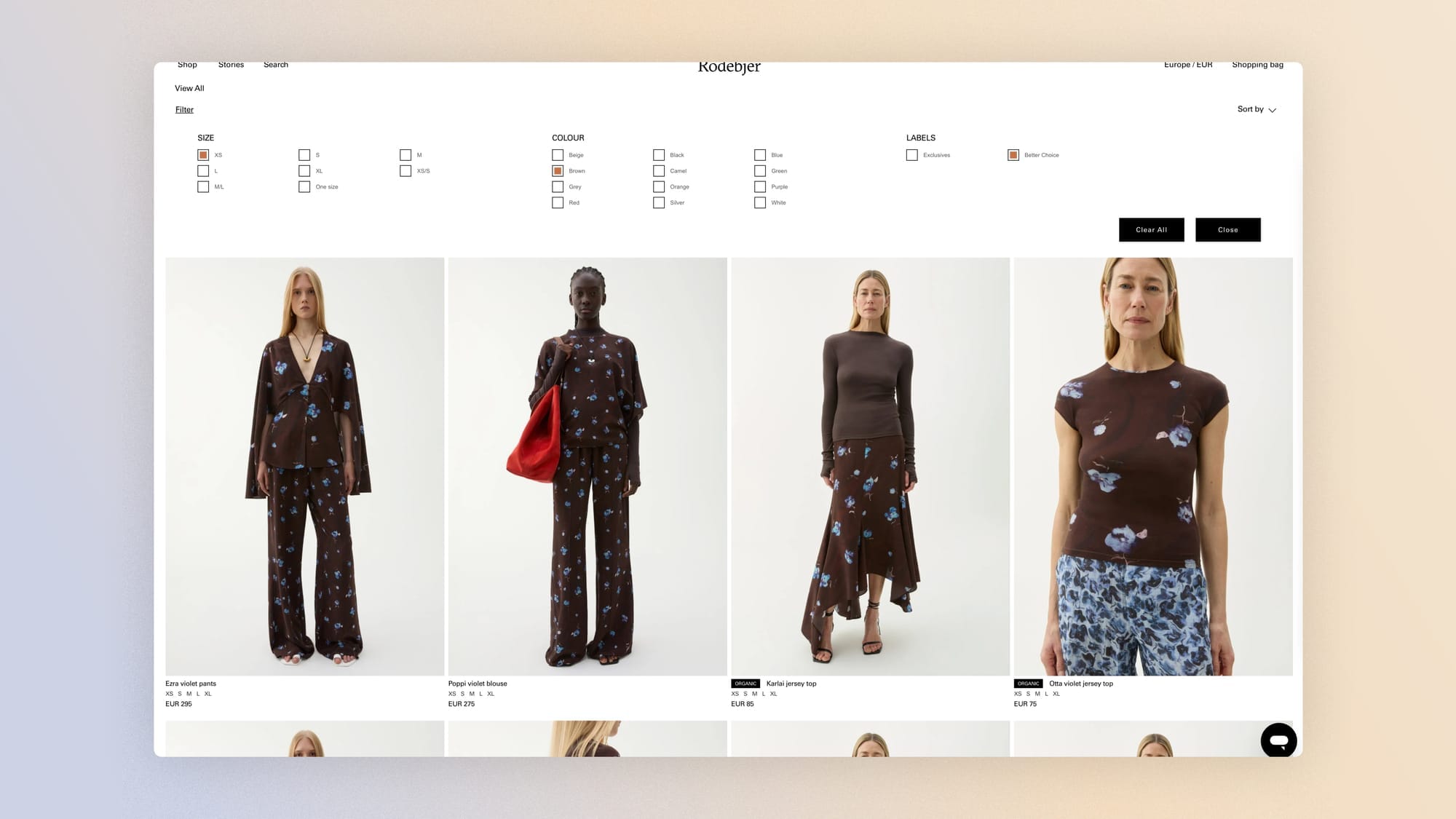
Two practices complete these checks. They're outside the checklist but backed by the same research: promote two or three key filters directly above the grid (the Baymard Institute finds that 61% of sites don't, even though the promoted filter is often what triggers the first action), and show the result count next to each filter value, so no click leads to an empty page.
And when a dead end happens anyway, the zero-results page is a checkpoint in its own right. An empty grid with only "No products match" is an invitation to leave the site; the same page becomes recoverable if it offers useful ways out:
- suggest loosening the most restrictive criterion,
- show related collections,
- show the category's popular products.
Zero results is rarely a design problem, by the way. It's a symptom of incomplete product data, inconsistent taxonomy across collections, or filters that ask questions the catalog can't answer.
Internal search fails in exactly the same way through a different entry point; the next guide in this series is devoted to it.
If we promote the two most-used filters (size and color) above the grid, with direct access, then filter usage and click-through to product pages will increase, because a visible filter prompts an action that a collapsed filter waits for.
Sorting: An Editorial Choice Disguised as a Technical Setting
The sort selector is the most underrated element on the page, for a simple reason: most visitors never touch it.
Which means the default order is the most-viewed merchandising decision in your store, and often nobody makes it: it's the catalog's import order, or a "featured" setting no one maintains anymore.
Highest-impact checks:
- Sort options exist and cover the attributes that matter: price, newness, popularity, relevance.
- A selection of popular products opens the collection. The first products people see shape their judgment of the whole collection; you don't open an aisle with leftover stock.

The default order deserves better than a single setting: it's a personalization opportunity. Sorting by newest for shoppers who return every week and by best-sellers for cold acquisition traffic are two good answers to two different questions. The simplest version needs no app: land acquisition campaigns on the collection URL sorted by best-sellers, while internal navigation keeps newest first.
That's exactly the kind of segmentation we advocate in this article:
 Robin Marzin
Further out lies a third tier: sorting personalized by individual behavior (what the session has already viewed, cohort affinity), available on Shopify through merchandising apps. It's a cost 2 to 3 project in our scoring grid, relevant once you have a large catalog and segmentable traffic.
Static, segmented, personalized: three tiers, and most stores already gain a lot by moving from the first to the second.
If the default order shows best-sellers to acquisition traffic and new arrivals to known visitors, then click-through to product pages will increase for both segments, because each audience sees what it came for first.
Product Cards: Miniature Product Pages
Each card in the grid is a product page compressed into a few square centimeters, and the audit asks the same question of it: what does someone need to know to decide to click, and is all of it visible without a click?
Highest-impact checks:
- Visual quality is flawless: it's the first driver of clicks, and the grid is where a brand's visual codes show most. Three brands we've analyzed, Polène, Rains and Jacquemus, earn part of their identity precisely there, in the discipline of their grids. For preparing the images themselves, our visuals guide applies to cards as much as to product pages.
- Available variants are visible on the card: color swatches, remaining sizes. A shopper who clicks only to find their size doesn't exist makes you pay for the disappointment in lost trust.
- Key information appears without a click: price, obviously, but also the average rating when there is one and the badge that positions the product.
- Badges (new, best-seller, sale, low stock) are used sparingly. One badge guides; five badges decorate. The golden rule: never more than one badge per card, the most informative one.
- A wishlist button on the card captures the intent of people who aren't ready to buy now: visible on hover on desktop, always visible on mobile. That click is gold downstream, because it fuels the most targeted lifecycle emails: price drop alerts, back-in-stock notices, post-visit reminders.
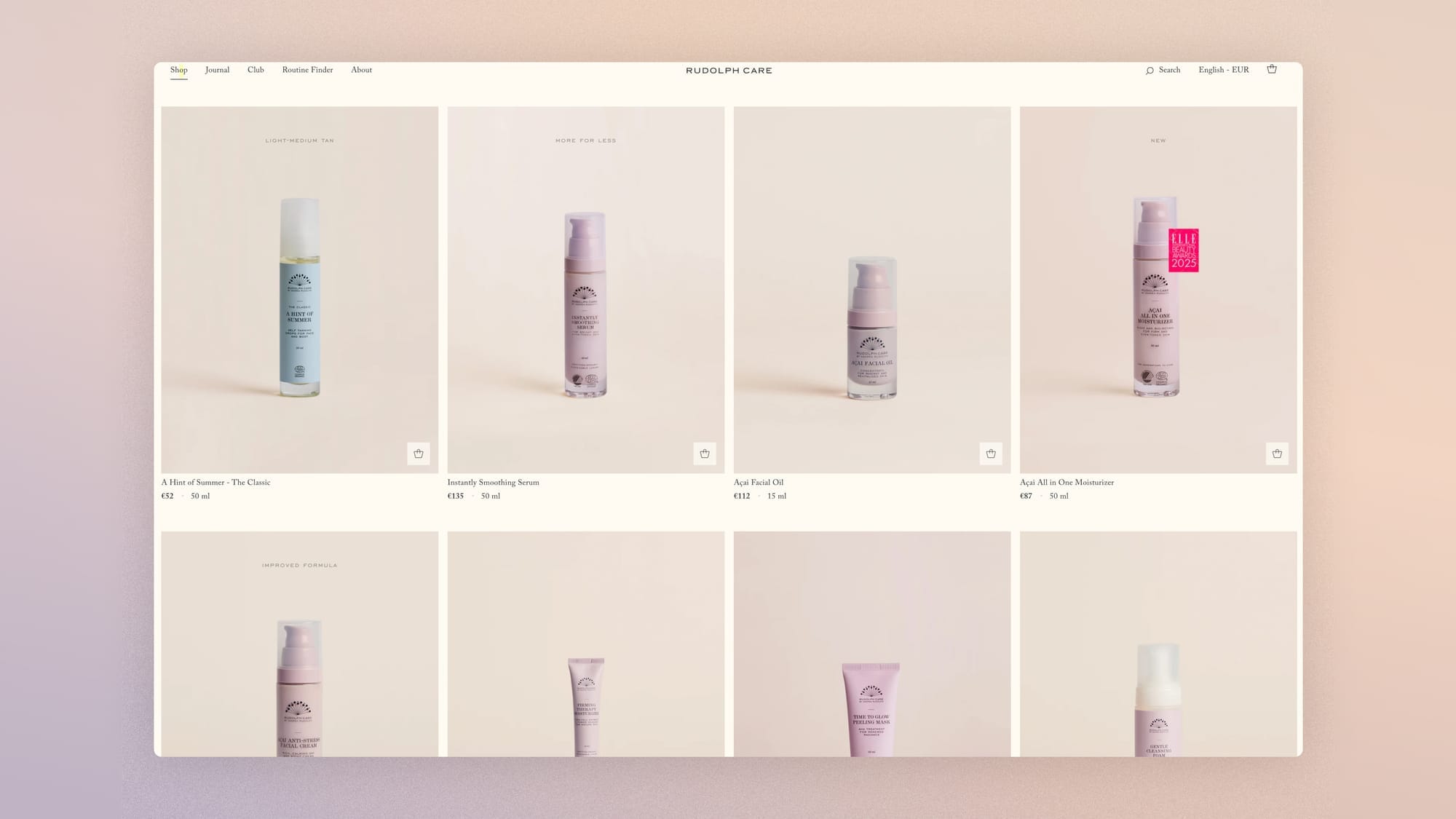
If cards show available color swatches and in-stock sizes, then click-through rate will dip slightly but the list-to-cart conversion rate will rise, because the lost clicks were disappointments waiting to happen.
The container for these cards deserves the same attention as their content. Start with the entry height: the first cards should be visible without scrolling.
A full-screen editorial hero turns the aisle into a poster, and the poster is paid for in products viewed. It's one of the diagnoses that comes up most often in our audits of collections used as landing pages. Next is density: on mobile, the number of columns is decided in the data, not in the mockup. Two columns spread attention and suit deep catalogs with distributed sales; one column concentrates it and suits short catalogs carried by a few hero products.
The actual structure of your sales (readable in GA4) points to the right answer before any test.
If we move from one to two columns on mobile for collections of more than 30 items with distributed sales, then add-to-cart rate will increase, because the discoverability of a deep catalog grows with the density of visible products.
Finally, one technical flaw specific to this page, invisible in mockups and common on Shopify themes: the first row of cards loaded lazily. The largest above-the-fold image is almost always a product card, so it determines the page's LCP; deferring it structurally degrades performance on every collection load.
The rule fits in one line: load the first row immediately, lazy-load everything else. Implementation details are covered in our technical guide to Shopify images. This is a defect, not a hypothesis: fix it.
The Return Trip: Invisible Friction
The real path through a collection page isn't linear, it's a pendulum: list, product page, back to the list, another product page. Each round trip is a cycle of the sorting machine, and the machine most often breaks on the way back.
- Position in the list is preserved when returning from a product page. Landing back at the top of a 200-product grid after viewing just one means asking shoppers to redo work they've already done. The pillar article ranks this loss of context among e-commerce's most underrated frictions, and our session recordings confirm it: abandonment is decided in these navigation loops.
- Applied filters and sorting also survive the return. A carefully built selection that vanishes the first time someone views a product page turns the filter into a trap.
The product page CRO guide sets out the twin checkpoint, seen from the other side: a back button that returns exactly where you came from, scroll position included. The two pages share this seam, and it's the first thing to break.
No test hypothesis here: a return that loses position is a defect, not a choice. Fix it.
The Collection Description: Three Readers, Two Levels
Collection descriptions have a bad reputation
Collection descriptions have a bad reputation, and they often earn it: a 400-word SEO block nobody reads, set between the title and the products like a toll booth. The checklist item only says a description section must exist; the audit says where and for whom.
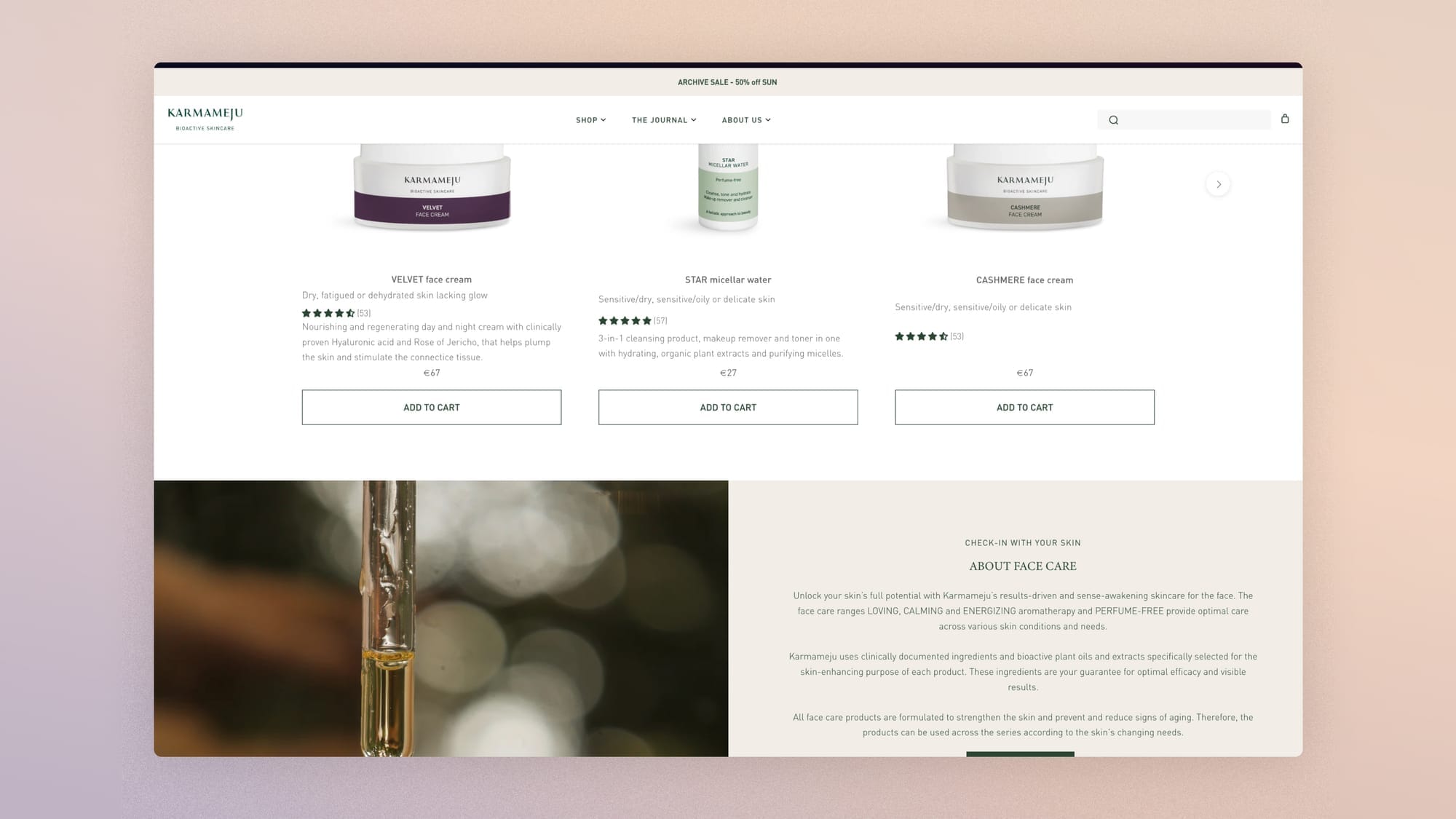
The architecture that reconciles these readers has two levels: one or two useful sentences under the title (what the collection contains, who it's for, what sets it apart), and the full text at the bottom of the page, after the grid, where it feeds search visibility without costing the products a single inch of screen. Human readers get context without the toll; the engine, classic or generative, gets a text that defines the category.
Two notes for the machine reader
In the code, the CollectionPage and ItemList schemas expose both the category definition and the structured list of products it contains, including position, URL and image: this is the format in which an AI agent reads a collection.
In the text, the bottom-of-page description works better when it defines than when it fills: for a generative engine to cite your collection in response to "where to find sustainable silk dresses," it needs text that explicitly links the content, the target customer and the distinctive features. A vague paragraph doesn't build that link; a precise definition does, and it also happens to be the most useful text for the human who scrolls this far.
One last trade-off, at the border of SEO
Not every filter combination should exist for Google, but a handful of high-demand combinations ("silk dresses," "wool coats") deserve better than a filtered URL: a real subcollection, with its own two-level description. It's the same decision as the effective catalog in the next section, approached from the other end: what your customers look for often enough to filter deserves to exist as an aisle, not a setting.
Measuring the Collection Page
Overall conversion rate says almost nothing about this page. Four metrics really judge it.
First, the list-to-product-page click-through rate: it's the page's mission, measured directly.
Next, the filter usage rate, with its most telling variant, the empty results rate: every filter combination that ends in zero products is a dead end you built.
Finally, scroll depth, cross-referenced with the position of clicked products: if 80% of clicks concentrate on the first row, your default order does all the work, and the rest of the catalog is a warehouse. The actionable version of this measure is your effective catalog: the depth at which click probability collapses marks the number of products your visitors actually see, and the question that follows is worth a merchandising meeting: keep 200 items in a collection where 8 get seen, or split into subcollections you actually showcase.
The craft brand from the introduction gave this question its most ironic answer: the least-visited collection in its store (0.3% of traffic) converted at 2.67%, five times the site average. Nobody was sent there, and it was the best-performing page in the catalog. Measurement isn't only for finding what's broken; it's also for finding what you've hidden.
On the instrumentation side, these four metrics cost less than they seem to: view_item_list and select_item exist natively in GA4 e-commerce and give you the list-to-product-page click-through rate as is; filter usage and zero results require two custom events (the filter applied with its criteria, and the result count when it drops to zero). An hour in GTM, and this page stops being blind.
A cohort comparison completes the picture: compare scroll depth and click-through rate between sessions with active filters and sessions without. A clear gap confirms your filters are doing their job; a small gap suggests the filters you offer don't match your customers' real decision criteria, and it's one of the fastest diagnoses to read in Clarity.
Session recordings complete these numbers with the pattern specific to this page: loops. Someone who chains list, product page, back, product page, back at an accelerating pace isn't browsing, they can't find what they want, and the cause is almost always upstream: cards that don't say enough, a sort that shows the wrong products first, filters that don't ask the right question. The full method for reading these sessions is in our Clarity diagnosis.
FAQ
Which filters should a fashion store offer?
Six filters cover most journeys: size, color, price, material, fit or style, and availability.
Size and color deserve direct access above the grid. Each collection then adjusts its filters to its content: filtering by cup size only makes sense in lingerie, and a filter with no purpose in a collection should disappear from it.
Do collection pages need a description?
Yes, in two levels: one or two sentences of context under the title, and the full text at the bottom of the page, after the products.
This architecture serves the page's three readers: the shopper who wants context without obstacles, the search engine that indexes the category, and the generative engine that needs text defining the collection in order to cite it in an answer.
Pagination, infinite scroll or a "Load more" button?
Every option has a cost. Pagination gives landmarks but interrupts momentum. Infinite scroll removes the interruption but makes the footer unreachable and weakens position memory on return.
A "Load more" button, combined with progressive image loading, gets the benefits of both: momentum is preserved, position stays addressable, the footer stays reachable. It's the compromise we recommend by default, to be validated against your own scroll data.
How do you measure collection page performance?
Four metrics:
- list-to-product-page click-through rate (the page's mission, measured directly),
- filter usage rate,
- its critical variant, the empty results rate,
- and scroll depth cross-referenced with the position of clicked products.
Overall conversion rate doesn't judge this page: it blends its effect with that of the product page and checkout, each of which is measured with its own metrics.
Get the complete checklist
The collection page checkpoints, with their impact and cost scores, explanations and visual examples, are part of the 194-point CRO checklist available in a duplicable Notion database, reserved for Conversion Club members.
 Jérémie Werner
Next guide in the series: internal search, ten checkpoints for the engine your most decisive customers use first.