The product page is the site's fitting room. It's the only page where shoppers are alone with the product, without the noise of the catalog around them, and it's where every euro of acquisition spend is won or lost.
The Baymard Institute, which maintains the industry's most extensive UX benchmark, estimates that 62% of major e-commerce sites have a mobile product page experience that is “mediocre or worse.” On desktop, it's 52%. More than one site in two, among those with the biggest budgets in the market, fails on the page that decides everything.
One data point from our own audits, to show what's at stake. For an apparel brand the authors work with, the March 2026 funnel was green almost from end to end: 67% of visitors reached a product page, and both the cart and the checkout hit their targets.
Only one red zone: the product page itself, with a 6% add-to-cart rate where our benchmark expects 12 to 18%. The whole site was doing its job except the page in the middle, where at least half of the store's potential evaporated.
This guide is the second in our CRO audit series, and it covers the densest zone of our 194-point checklist: around fifty checkpoints for the product page alone.
 Jérémie Werner
A note on scope before we start: this guide audits the page's structure, meaning what should be on it and where. For the behavioral diagnosis, what your users actually do on that structure, the natural companion is our product page CRO diagnosis with Microsoft Clarity.
What a product page has to accomplish
Someone landing on a product page isn't buying yet. They're hesitating. The page's job is to turn that hesitation into certainty, one way or the other: a quick “no” beats a “maybe” that wanders around and then disappears.
The audit below follows the pillar's method: each checkpoint carries an impact score and a cost score, and each zone ends with a hypothesis written for your testing program. The points cited here are the maximum-impact ones; the checklist documents the rest.
The buy box: where everything is decided
The buy box is the block around the buy button: title, price, variations, CTA, shipping. About twenty checkpoints are concentrated here, more than in any other zone of the checklist, because this is where hesitation gets resolved or hardens.
The title and the promise
- The product title is visible, clear and evocative, and stays under 65 characters so it displays in full on Google.
- The subtitle highlights key benefits with carefully crafted UX copy. That's the habit at Rhone, which turns every subtitle into a product promise.
- A short list of benefits, close to the title, links to the detailed description.
- The review summary (rating, volume) appears near the title and links to the full reviews.
Price, with no blind spots
- The price is close to the main CTA. If there are additional fees, they're displayed.
- When there's a discount, the old price and the savings are clear at a glance.
- The price updates in real time when a variation or quantity is chosen.
- For high-priced products, installment payment (Alma, Klarna) is offered, and the cost of each installment is shown. “3 x €65” lands differently from “€195” in a shopper's mind; hiding it means giving up that effect.
Variations and size
- Variation selectors work on mobile: big enough, spaced far enough apart.
- A size guide sits next to the size selector, not buried in the footer.
- The description mentions the model's size and the size they're wearing. Cost 1, impact 3: it's one of the best ratios in the whole checklist, and one of the leading causes of avoidable returns in fashion.
- If a visitor clicks “Add to cart” without choosing their attributes, a clear alert says so, instead of a button that doesn't respond.
The CTA and trust
- The main CTA is the most visible element on the page, and it changes state when the item is added to the cart: the mini-cart opens, something happens.
- Shipping information (cost, delivery time, in-store pickup) is visible near the CTA, without scrolling.
- The return policy is stated clearly. According to the Baymard Institute, 10% of users abandon a site because of an unsatisfactory return policy, and 42% of sites don't even show this information on the product page. It's the silliest friction in e-commerce: losing a sale over a question whose answer already exists.
- Express payment options (Shop Pay, Apple Pay, PayPal) shorten the path for those who have already decided.
- On the CTA wording itself, beware of certainties: we documented a test where an “exotic” button wording beat the classic “Add to cart”, going against every best practice. Context decides, not the manual.
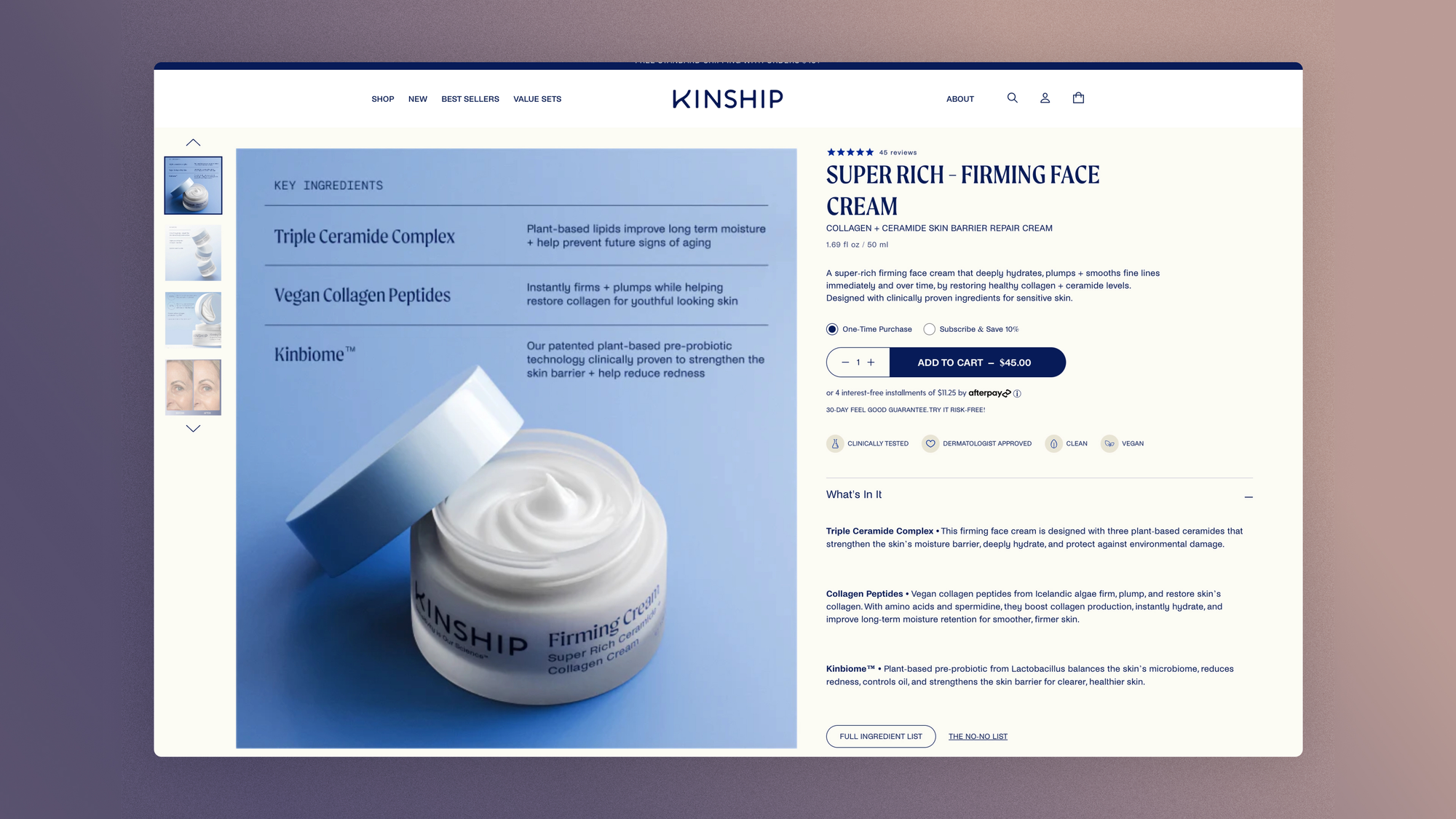
If we display the delivery time and shipping cost directly under the main CTA, then the add-to-cart rate will increase, because logistics uncertainty is one of the last active objections at the moment of the click.
One last point on this zone, invisible in mockups: stability. When the price or CTA loads late and shifts the layout at the exact moment the thumb lands, the product page produces missed taps and abandoned gestures.
This shift has a technical name, CLS (Cumulative Layout Shift), and the buy box is where it costs the most on the site. Reserving space for elements that load late takes a single line of CSS.
If we eliminate layout shift on the buy box by reserving space for late-loading elements, then the mobile add-to-cart rate will increase, because visual instability causes accidental taps and interrupted gestures.
The gallery: what words can't show
Online, the gallery replaces the hand. No fabric to crumple, no weight to feel: images, and nothing else. We devoted an entire article to this topic.
Highest-impact checkpoints:
- The main photo is attractive: it decides whether the rest of the gallery gets looked at.
- The gallery shows different photos of the product: worn, flat, close-up, in context.
- Every product variation has its own image. Selecting “midnight blue” and seeing the camel model is a small betrayal that costs you trust.
- On mobile, the gallery works by swipe; on desktop, arrows and thumbnails let people navigate.
- A zoom feature is offered, and it works with pinch on mobile.
- Every image has descriptive alt text. One line of code for three readers: the visually impaired person, the Google Images crawler and the AI agent that indexes your catalog.
Technical performance is part of the audit: poorly prepared images slow the page down and degrade zoom. The technical guide to Shopify images covers the formats, sizes and compression to follow.
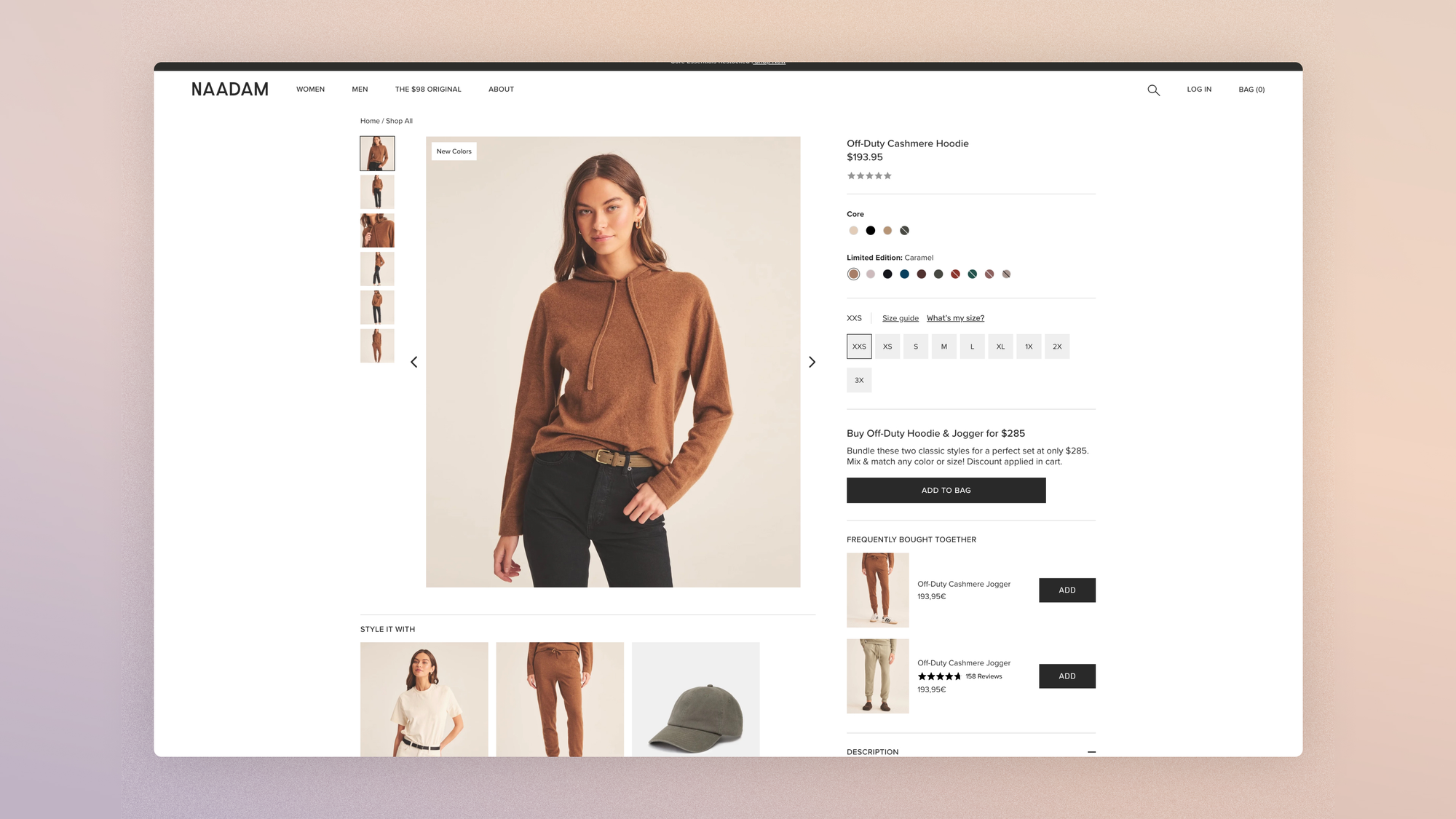
If the first gallery image shows the product worn in a real setting rather than as a packshot, then the rate of full gallery views will increase, because projection comes before inspection.
Beyond the photo, there's motion. The gallery is built in cost tiers: a model video shot during an existing shoot is a cost 1 or 2 in our grid, while 3D modeling and augmented reality try-on are cost 3, reserved for brands that make them a deliberate differentiator.
For fashion, the middle tier is often enough: a few seconds of fabric drape in motion answer the question zoom never resolves, how it moves.
If we add a 15-second video of the product worn in motion, in second position in the carousel, then the return rate on the affected items will drop, because motion resolves fit uncertainty more effectively than static inspection.
The product description: structuring hesitation
Nobody reads a product description. Everybody consults it. The difference is structural: you don't write a text, you organize answers.
Highest-impact checkpoints:
- Information is prioritized: benefits first, in short groups, specifications after.
- Accordions segment the types of content (material, care, shipping, brand) without drowning the buy box.
- The description explains use or composition, depending on the product: how it's worn, or what it contains.
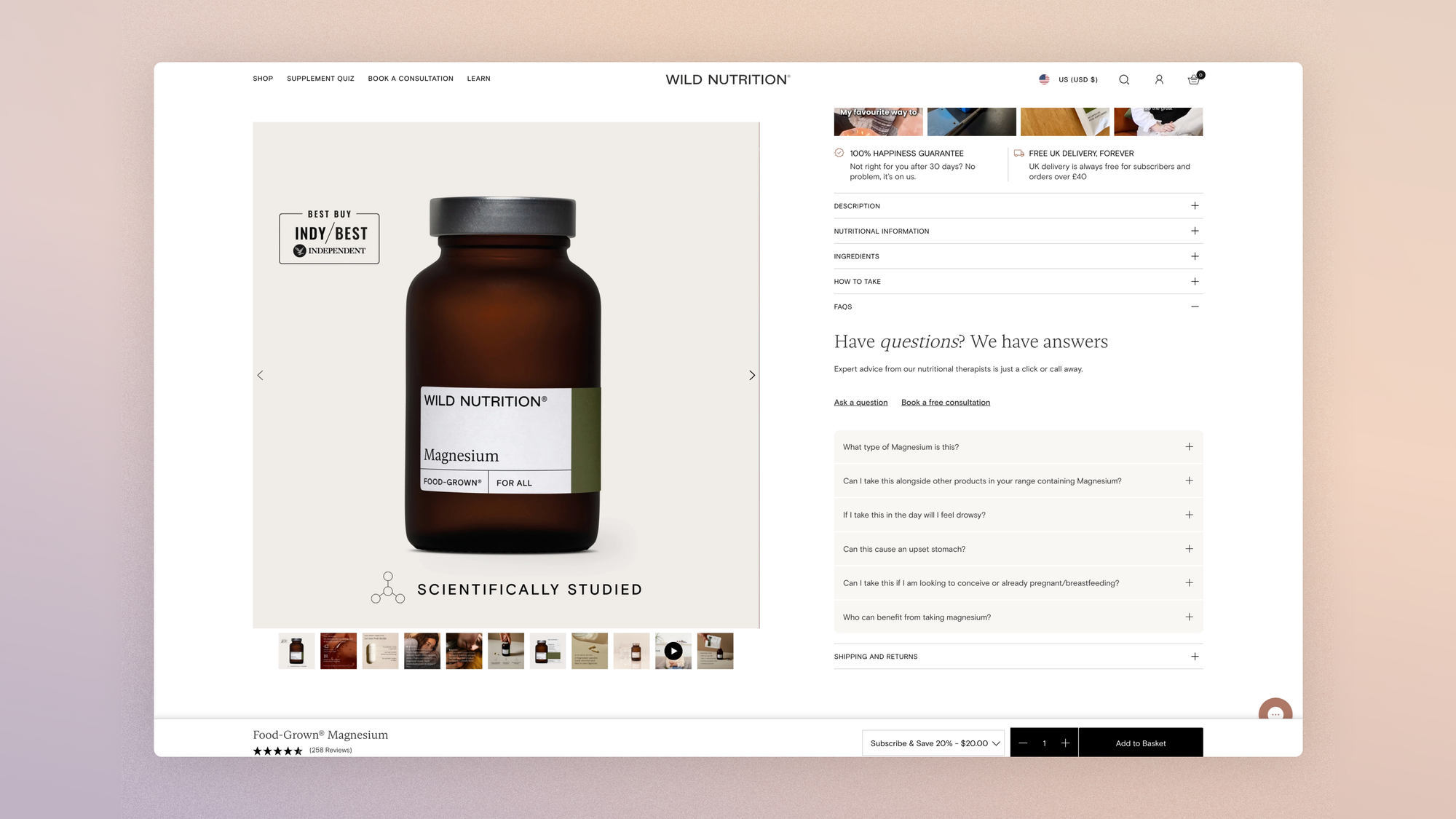
- A product-specific FAQ complements the store's general FAQ and answers lingering doubts. Its second reader shows up further down.
- Technical specifications stay easy to read: a table beats a paragraph.
For the writing itself, our product page writing framework extends this guide with the content structure, block by block.
If we replace the monolithic description with themed accordions with benefits open by default, then the scroll rate to reviews will increase, because the page becomes scannable again.
Social proof: delegating persuasion
By this point in the journey, the brand has said everything it can say. The floor goes to customers, and the audit checks that their voice can be heard.
Highest-impact checkpoints:
- Reviews are shown in full: title, rating, photo if any, first name, useful details (size purchased, body type).
- Reviews can be filtered and sorted. A shopper looking for “reviews from people my size” is doing reassurance work that no one else can do for her.
- The product page features customer photos of the product being worn. The Baymard Institute finds that 67% of sites don't include social media visuals on their product pages even though their products lend themselves to it.
- Video testimonials, when they exist, do what no written review can: show the product on a body that isn't a model's.
- Press logos and collaborations provide external endorsement, near the buy box, in a discreet format.

UGC deserves its own strategy, which we detailed in this guide: the product page is where it lands, not where it starts.
If the review summary near the title becomes clickable and expands the rating distribution, then the conversion rate of first visits will increase, because the distribution reassures more than the average does.
Marketing drivers: urgency, scarcity, bundles
This zone calls for precision: all these drivers work, and all of them can damage the brand if they lie. The rule we apply is simple: an urgency driver is only shown if it's true. A fake stock counter is a dark pattern, not an optimization, and we've written about why respect is the R in CRO.
Highest-impact checkpoints:
- Real scarcity drivers (“Only 3 left in stock”) appear near the main CTA.
- Urgency drivers are used when they're true: a dated offer, a limited bonus. Drop mechanics push this logic to its maximum; we analyzed the four schools of scarcity for brands that want to make it a strategy rather than a gimmick.
- Bundles or a subscription are offered with a significant discount.
- Quantity or frequency discounts reward engagement.
- A related products section opens the next step of the journey, without cannibalizing the buy box.
On those related products, the checkpoint that matters: are they presented as an outfit or a styled context, or as a grid of thumbnails? Algorithmic cross-sell (“frequently bought together”) produces data; editorial cross-sell (“complete the look”) produces average order value. The first costs nothing, the second costs merchandising, and it's the one that looks like your brand.
If the real stock indicator appears only below a critical threshold (fewer than 5 units), then the conversion rate on the affected products will increase without eroding trust, because the scarcity communicated remains verifiable.

The AI shopping agent: the third reader of your product page
Your product page has long had two readers: the human who hesitates and the Google crawler. The third is already here. Inès is looking for a dress for a wedding in Provence; she didn't open fifteen tabs, she asked her AI assistant.
That assistant is reading your page right now. It doesn't scroll the gallery. It feels nothing looking at your main photo. It queries your structured data, and if that data is missing or incomplete, your product doesn't exist in its answer.
The checkpoints in this zone are verified in the code, not in the mockup:
- The Product schema is complete:
aggregateRating,offerswithavailability,shippingDetails,returnPolicy. Every missing field is a question the agent will answer with a competitor's page. - The product FAQ recommended above is marked up with
FAQPage. The same content serves twice, without a single extra line of writing. - A
BreadcrumbListexposes the product's position in the catalog.
The topic goes well beyond the product page; we covered it in depth in our guide to writing for both humans and AI agents, and that's precisely what a GEO audit measures.
Classic A/B testing doesn't measure this reader. Tracking happens elsewhere, in the share of traffic and sales attributed to AI assistants, a metric that deserves a line in your dashboard starting now.
Go further:
Is your store recommended by AI agents? Analyze your GEO visibility for free in 2 minutes
Turning the audit into a testing program
The pillar's rule applies here too: separate defects from hypotheses. A gallery with no zoom, a size guide nobody can find: those are defects, and you fix them without testing. The hypotheses in each section above, on the other hand, get tested, because they rest on choices whose effect depends on your audience.
Two measurement notes before you launch anything. First, the overall conversion rate is a poor judge of the product page: track the add-to-cart rate and revenue per visitor, or you'll attribute to the PDP effects that play out at checkout. Second, your average results hide segments: a test can win on average and lose on your most profitable segment.
Beneath those two metrics, a layer of micro-conversions diagnoses where the page fails before the add-to-cart signal:
- scroll rate to the buy box: do your mobile visitors even reach the CTA?
- gallery interaction rate beyond the first image;
- click rate on the size guide, a direct proxy for fit hesitation;
- open rate of each accordion, the map of your active objections;
- signup rate for back-in-stock alerts.
Everything is measured with GA4 events and read in Clarity: that's the junction between this structural audit and our behavioral diagnosis.
An example from our testing zone, on the buy box specifically. Same apparel brand: in May 2026, we tested a hierarchy inversion of the product page's two CTAs. “Add to cart” became solid black, the express checkout button became white with a border, with an explicit label in place of a payment provider logo. A repaint, nothing more.
After 17 days: +17.4% conversion rate (significant, confidence interval entirely positive) and +6.2% add-to-cart (a trend, not yet locked in) over the period.
With two caveats in the interest of statistical honesty: the effect was driven by desktop, and the second half of the test showed an erosion that led us to extend the experiment before concluding. That's the culture this guide tries to pass on: measure rigorously, even when the number is flattering.
FAQ
What elements should an e-commerce product page contain?
A complete product page has five zones: the buy box (title, price, variations, CTA, shipping and returns), the gallery (photos per variation, zoom, mobile navigation), the structured description (benefits, specifications, product FAQ), social proof (filterable reviews, customer photos, testimonials) and marketing drivers (scarcity, bundles, related products).
Add to that the cross-cutting elements (breadcrumb, reliable back button, sticky CTA on mobile) and an invisible layer: the structured data (Product and FAQPage schema) that makes the page readable by AI agents.
In what order should you optimize a product page?
Start with the objective, low-cost defects: size guide next to the selector, shipping and return information near the CTA, an image per variation, an alert when attributes aren't selected.
Continue with the hypotheses to test: image order, description structure, scarcity display. The heavy projects (installment payment, filterable reviews, video testimonials) get planned over a quarter.
How do you measure product page performance?
Three main metrics: add-to-cart rate (the decision made on the page), revenue per visitor (the combined effect of conversion and average order value) and product return rate (the quality of the information given before purchase).
The overall conversion rate blends the product page's effect with that of the cart and checkout: track it, but it doesn't judge this page alone.
Get the complete checklist
The product page checkpoints, with their impact and cost scores, explanations and visual examples, are part of the E-commerce CRO Checklist: 194 Checkpoints to Audit Your Store, available in a duplicable Notion database reserved for Conversion Club members.
Access the resource:
 Jérémie Werner
Next guide in the series: the checkout, the zone where every form field has to pay for itself.